
Run MySQL and DuckDB on the same connection
Point your application's reads at port 3309 instead of its MySQL. Lookups and small reads are still answered by your MySQL, reports and big scans by DBTrail's copy, and you do not change a query.
Guide · Port 3309 · Read routingExperimental
InnoDB for the fast. DuckDB for the heavy. One connection.

Nothing to markMySQL's own plan for each query decides who answers it.
Light reads are liveThey run on your MySQL, exactly as today.
Heavy reads see the copyAs of its last update. You choose how often it updates.
- It only reads.As it comes, a write sent to it is refused and never reaches your MySQL.
- Your MySQL does not change.Nothing is installed on it. You add one read-only user.
- To go back, point at your MySQL again.Your application talks to it as before.
What “experimental” means here
- Safe today: as it comes it cannot change your data, and a query that runs out of memory here cannot take the capture of your changes with it.
- Still growing: the list of queries the copy would answer differently from MySQL. The ones we know are kept on your MySQL.
- Not ready for: an application that cannot tolerate an error when the port is busy or restarted. Read Routing in production first.
A report, a dashboard, a count over a whole table: a few expensive queries are what make a database slow for everyone else. With read routing on, your application sends its reads to DBTrail on port 3309, and each one goes to whoever should answer it: your MySQL for a light query, the copy for a heavy one.
What each engine is good at
We ran the same 14 reports, with the same parameters, on a MySQL replica and on DBTrail's copy of the same database, round after round for a day.
Twelve of the fourteen were faster on the copy: 6.5 times faster overall, and the heaviest went from 225 seconds to 7.9. Two were faster on MySQL, and they are the two lightest: one takes 4 milliseconds on MySQL and 103 on the copy. Neither engine wins everything. That is the reason to keep both behind one port, and not to move every query to the copy.
What was measured: each engine answering the reports by itself, not the routing. A 200-warehouse order-entry database built and kept under constant writes by HammerDB, 4 CPUs on each side, a MySQL 9.7 replica. Times are the average of 317 runs of each report, and each row's figure is one average divided by the other. The copy ran between one and five minutes behind the source. The replica had no lag.
Is it for you
It suits you when a report slows your database down, or when you were about to add a read replica only to run heavy queries. It does not suit a query that is heavy and must also see a write made a second ago: heavy queries read the copy, and the copy is as current as its last update.
Two things to know before you start:
- Reads move, writes stay. As it comes, this port only reads. Your application keeps its connection to your MySQL for writes, and uses this port for reads.
- It is one switch. This is the same port as Query Parquet with MySQL, with read routing turned on. With the switch off, the copy answers everything.
Set it up
Have this at hand
- DBTrail 0.104.0 or newer, with the port turned on
- The port and its password come from Query Parquet with MySQL, step 1.
- A MySQL login that can create a user
- Used once, in step 1. DBTrail never uses it.
- A terminal on the DBTrail machine
- With the
mysqlclient, to try it before any application does. - The name of your server in DBTrail
- As the left sidebar shows it. This guide calls it
shop.
Make a read-only user
On your MySQLCreate a user that can read what your application reads, and nothing else.
Replace shop with your database's name.
CREATE USER 'app_reader'@'%' IDENTIFIED BY 'choose-a-password';
GRANT SELECT ON shop.* TO 'app_reader'@'%';
DBTrail uses this user when it passes a statement on to your MySQL. This guide calls it the forwarding user. What it is granted is the most this port can do on your MySQL.
SHOW GRANTS FOR 'app_reader'@'%'; lists SELECT on shop.* and no other
privilege.
Give that user to DBTrail
Web interface · ServersOpen Servers, press Edit on your server, fill in Forwarding user and Forwarding password with the user from step 1, and save.
DBTrail captures your changes with a different, more powerful account. This port never uses that one. So a server with no forwarding user is not routed: the copy goes on answering it alone.
Test connection, on the same form, logs in with the forwarding user too and names it in its answer.
Make the copy, and keep it updating
Web interface · SnapshotsHeavy queries are answered from the copy, so there has to be one, and it has to stay current.
- The first copy: Snapshots, then Read database now. It reads all your tables once. Skip this if your server already has a snapshot.
- The updates: Snapshots, tab Settings, card Update the copy. Pick how often and press Turn on. It is off until you do, and a copy that never updates answers heavy queries with older and older data.
A snapshot in the list with today's date, and the Update the copy card showing its schedule.
Turn routing on
Web interface · SettingsOpen Settings, MCP Server, and find the panel Connect a SQL client. Next to Read routing, press Turn routing on, and confirm.
The switch is for the whole port: every server that has a forwarding user is routed. Turning it on or off closes the connections that are open. Clients reconnect.
Read routing On, and under it: "Light statements run on each server's own MySQL. Heavy SELECTs run on the copy. A statement that would change the server is refused."
Try it from a terminal
DBTrail machineConnect before any application does. The user is your server's name, and the password is the port's.
mysql -h 127.0.0.1 -P 3309 -u shop -p shopRun one light query and one heavy one. Use a table of yours with many rows for the second.
SELECT * FROM orders WHERE id = 42;
SELECT status, COUNT(*) FROM orders GROUP BY status;Both answers, as your MySQL would give them. Nothing tells them apart: that is the point. The next step shows who answered.
See who answered
Same terminal, or the panelAsk the port what it did:
SHOW ROUTER STATUS;That is an excerpt: the real answer has a few more rows. statements_copy
went up by one: the GROUP BY never ran on your MySQL. If
it stayed at zero, the table was small enough for MySQL to answer cheaply.
Try a bigger one.
The same count is on the panel, for the server picked in the sidebar: two figures over a bar. Under them, The router's numbers unfolds how old the copy is and how many workers are busy, and Why each side counts the statements by reason.
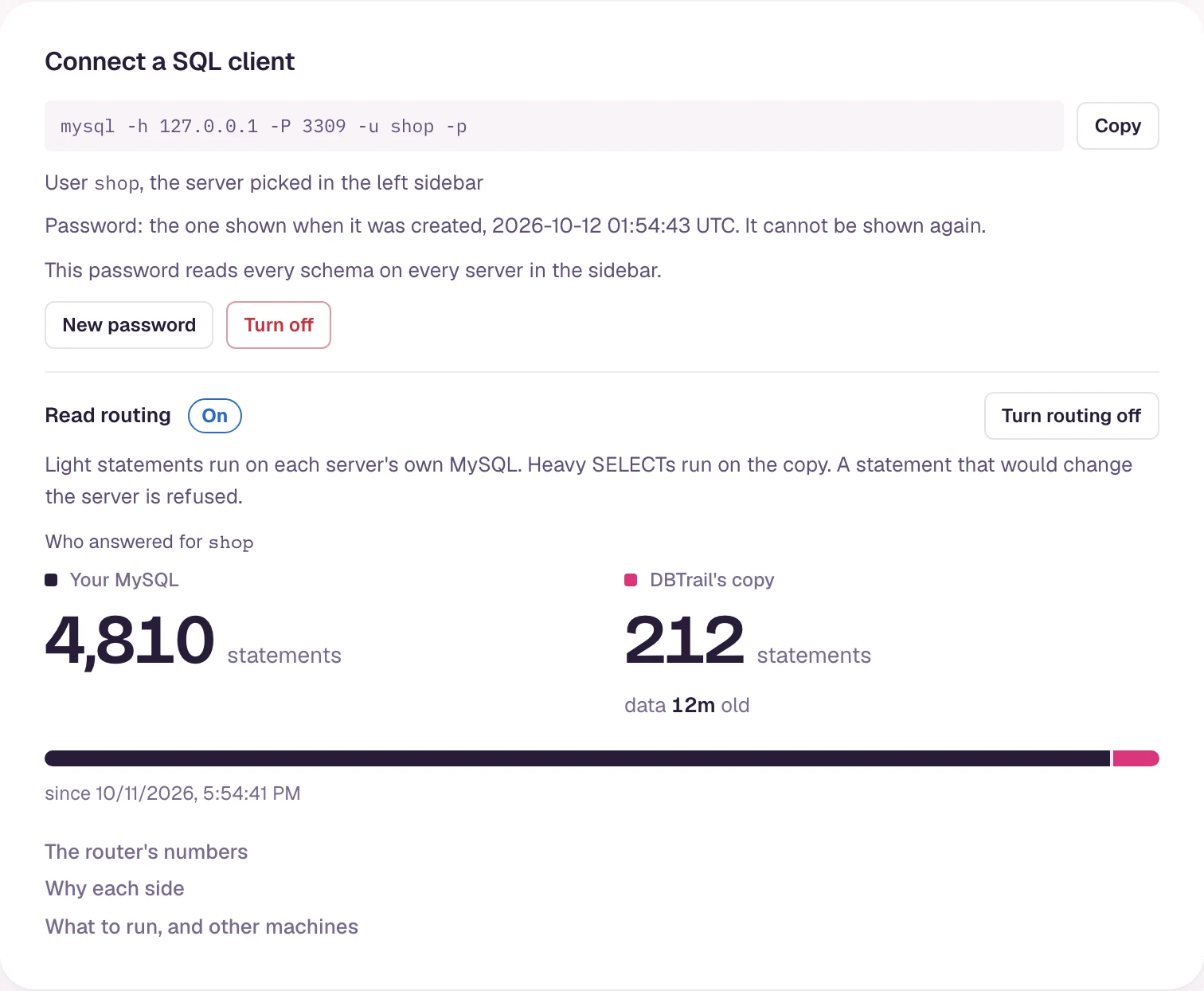
Move your application's reads
In your applicationFour things change in the connection your application reads with: host (the DBTrail machine), port (3309), user (your server's name in DBTrail) and password (the port's).
- Writes stay where they are. As it comes, the port only reads, so your application keeps its connection to your MySQL for writes and migrations, and uses this port for reads. If it has one connection for everything, it needs a second one.
- Keep autocommit on for that connection. Inside a transaction every
query goes to your MySQL, so that a read sees your own write. A driver that
starts with autocommit off is always inside one, and nothing reaches the
copy. Python's PyMySQL does: open its connection with
autocommit=True. - Check your queries first.
bintrail-console sql-compareruns your queries on both sides, from a file or sampled from what your MySQL recently ran, and lists the ones that would answer differently.
Your application working as before, and the DBTrail's copy figure going up when its reports run.
Next
- How routing decides: who answers what, what the copy cannot answer, what happens when it is busy, and how old the copy is.
- Routing in production: what to know before an application depends on this port, how to let writes through, and what each error means.
Query Parquet with MySQL
Use the MySQL client you already have to query DBTrail's copy of your tables, on port 3309, with no load on your MySQL.
How routing decides
Which statements your MySQL answers and which ones DBTrail's copy answers on port 3309, what the copy cannot answer, what happens when it is busy, and how old the copy is.