
Query Parquet with MySQL
Use the MySQL client you already have to query DBTrail's copy of your tables, on port 3309, with no load on your MySQL.
Guide · Port 3309
Ask your data anything, with the client you already use.


No load on MySQLThe query runs on files on the DBTrail machine.
As of the last updateThe copy is as current as its schedule. You set it.
DuckDB's SQLClose to MySQL's, with a few differences listed below.
- It only reads.SELECT and SHOW. A statement that would change data is refused.
- Small on purpose.10,000 rows and 60 seconds per query.
- Off until you turn it on.One button in the web interface. No restart.
DBTrail reads your MySQL and keeps a copy of your tables as Parquet files,
updated on the schedule you set. This page is how to query that copy with the
MySQL client you already have: mysql, a driver, a BI tool. The query runs
on the DBTrail machine, so your MySQL does no work for it.
It suits a report, a count over a whole table, a look around the data. The copy is as current as its last update, so it does not suit a question about the last second.
Not a MySQL client? DuckDB on your laptop, a dashboard tool and Spark and Trino through Iceberg read the same copy.
Set it up
Have this at hand
- DBTrail 0.104.0 or newer, with your server added
- Not yet? Start with the Quick Start.
- A snapshot of your server
- The copy is read from the DBTrail machine’s disk. If your snapshots are kept only in S3, DBTrail brings the newest one to that disk by itself.
- A terminal on the DBTrail machine
- With the
mysqlclient. The port answers only on that machine until you open it to others: see From another machine, under Limits.
Turn the port on
Web interface · SettingsOpen Settings, MCP Server, find the panel Connect a SQL client, and press Turn on. No restart.
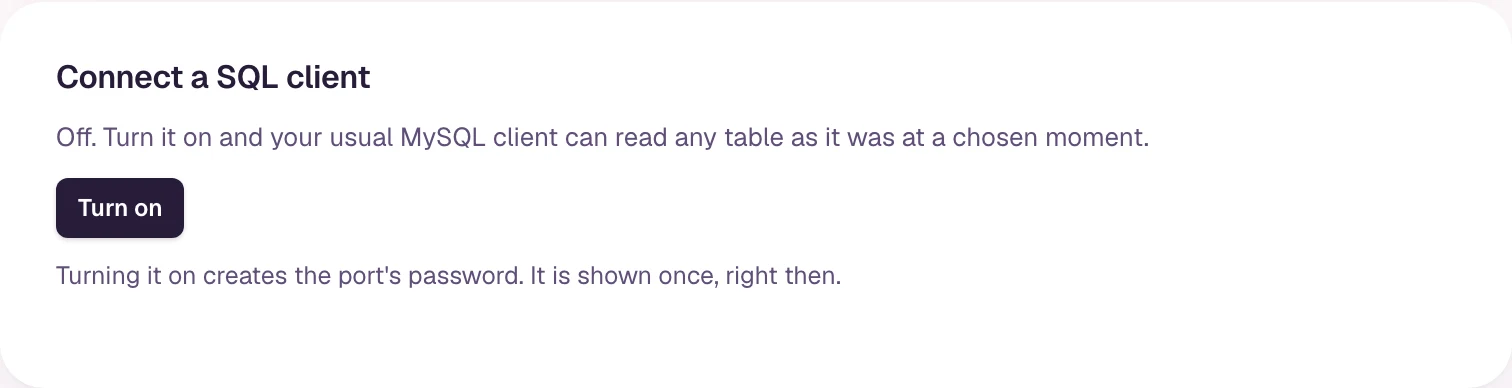
A ready mysql line, and under it the password, shown only now. Copy both.
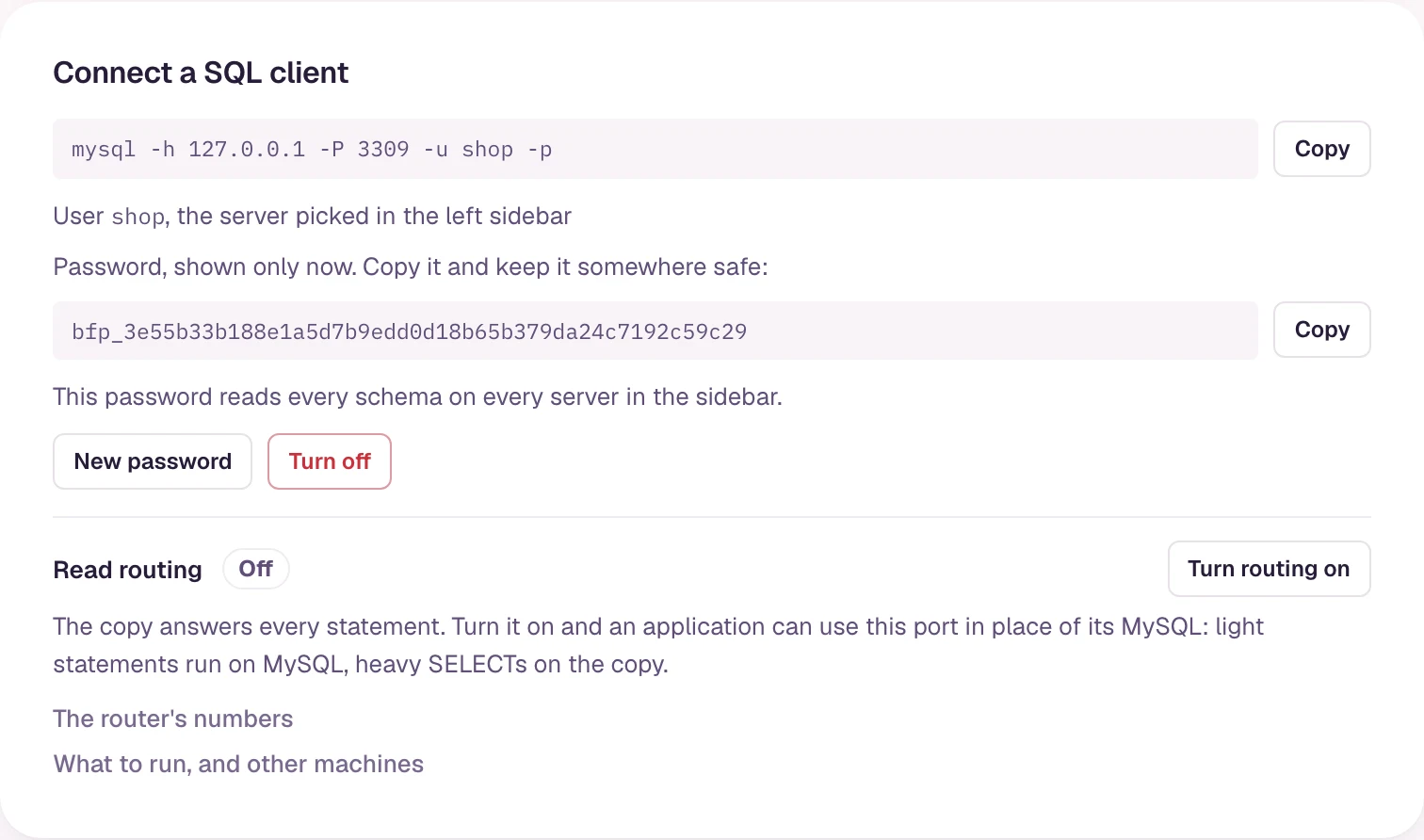
New password replaces it. Turn off closes the port. Both disconnect whoever is connected.
Connect
Your terminalThe user is your server's name in the left sidebar. The password is the one from step 1.
mysql -h 127.0.0.1 -P 3309 -u shop -pThis one password reads every table of every server in the sidebar. Keep the port on the DBTrail machine or a private network.
The mysql> prompt.
Ask
Same terminalSHOW DATABASES;
USE shop;
SHOW TABLES;
SELECT status, count(*) FROM orders GROUP BY 1;
SELECT o.id, c.name FROM orders o JOIN customers c ON c.id = o.customer_id LIMIT 20;Your databases and tables, and the answers. None of it ran on your MySQL.
The copy is as current as its last update:
Keep it current. The same
connection also travels in time:
AS OF queries.
The SQL is DuckDB's
The client is MySQL's. The statement runs in DuckDB exactly as you typed it: nothing is translated. Where the two differ, write DuckDB's form.
Write orders or "orders". Backticks are not converted.
Write strftime(d, '%Y-%m').
It runs, and the order of its list can differ from MySQL’s. Check it before you rely on it.
Text compares as MySQL's default does: 'Paid' equals 'paid'. Table names
match whatever their case: FROM Orders finds orders. What still answers
differently: SQL on the copy.
From an application
- Prepared statements work, with Go's
database/sql, Connector/J, Node'smysql2, .NET'sMySqlConnector, PHP'smysqlndand the C API. Cursors are refused, with error 1105. SET time_zoneandSET sql_select_limitare applied. What the copy cannot honour is an error, not ignored:'+05:30'is error 1298 (use the zone's name,'Asia/Kolkata'), andsql_mode=ANSI_QUOTESis error 1231.- There are no transactions.
SET autocommit=0is accepted and changes nothing. - Backtick names are not understood, and most ORMs write them. With read routing on, those names are rewritten for the copy and your MySQL answers what the copy cannot.
- Tested with the
mysqlcommand-line client. DBeaver and Workbench are not tested, and may show an incomplete list of tables.
Limits
Small on purpose: a report should not be able to take the machine.
How many statements run at once is worked out from the cores and the memory
the port may use: half of the machine, unless you
set a ceiling or the number itself.
Any number of clients can connect. The wait had a limit of 30 seconds
before DBTrail 0.104.1. SHOW ROUTER STATUS; on the same connection says the number,
as pool_workers.
Where the change log is kept in S3, a statement that reads it (events) is
refused here. For one row's history use
_diff.
A team or a dashboard tool gets its own DuckDB instead, with no load on this machine: Dashboards.
Next: let your MySQL answer the light ones
As it comes, the copy answers every statement on this port. Turn read routing on, one switch on the same panel, and an application can use the port in place of its MySQL: light queries run on your MySQL, heavy ones on the copy, and it keeps writing MySQL's SQL. Run MySQL and DuckDB on the same connection.
Query with DuckDB
Four ways to query the Parquet copy with DuckDB: reading S3 from your computer, from downloaded files, on the DBTrail machine, or inside its Docker container.
Run MySQL and DuckDB on the same connection
Point your application's reads at port 3309 instead of its MySQL. Lookups and small reads are still answered by your MySQL, reports and big scans by DBTrail's copy, and you do not change a query.