
Architecture
What DBTrail is made of, what connects to what, what it never does to your database, and what stays on your side.
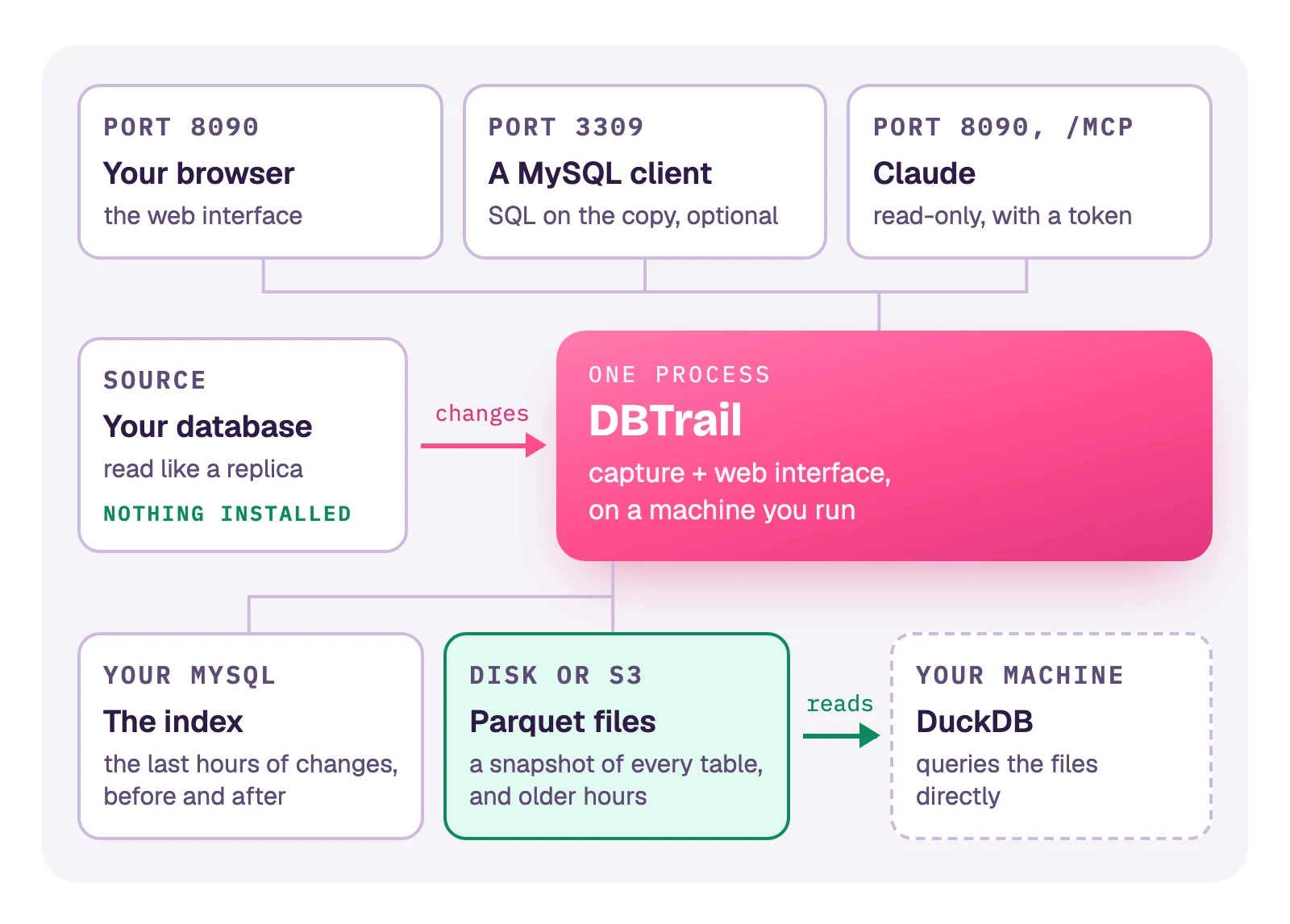
DBTrail is one program that you run next to your database. It follows every row change the way a replica does, keeps the recent ones in a MySQL of its own and the older ones as Parquet files, and lets you read all of it. Nothing runs inside your database, and no data leaves machines you control.
The parts
Your database (the source). MySQL, MariaDB or PostgreSQL, wherever it already runs. DBTrail connects to it with one account, like a replica would, and reads the changes it already writes to its binary log (on PostgreSQL, its write-ahead log). It stores nothing there.
DBTrail. One process (bintrail-console watch) that does three jobs:
it captures the changes, it serves the web interface, and it builds the
Parquet files. It runs on a Linux machine or container of yours. It keeps a few
small files of its own: the list of servers you added, the login, and the
settings. Run exactly one per source. A second one pointed at the same index
waits its turn; it does not capture twice.
The index. A MySQL 8.0 or newer that DBTrail writes to. Every change lands here within seconds, with the row as it was before and as it is after. It holds the last hours (48 by default) and the position capture resumes from after a restart. The Docker Compose stack brings one. Anywhere else you point DBTrail at one of yours, for example RDS.
Parquet files. Two kinds:
- Snapshots: every table as one file, at one moment, in a folder or an S3 bucket you choose. The first comes from a full read of your database. Later ones are built from the previous snapshot plus the changes, without reading your database again.
- Hourly archives: with an S3 bucket set, each hour that leaves the index becomes one file there, so the history goes back further than the index does. Without one, those hours are dropped.
How they fit together: How the Parquet copy works.
What reads it.
- The web interface, in your browser: history of a row, undo SQL, snapshots, checks, settings.
- DuckDB on your own machine, reading the Parquet files directly. DBTrail is not in the path: Query with DuckDB.
- A MySQL client, through a port you turn on: Query Parquet with MySQL.
- Claude, read-only, with a token you create: Connect Claude.
What connects to what
Every connection to your database and to the index starts from DBTrail. Neither ever connects back.
| From | To | Port | For |
|---|---|---|---|
| DBTrail | Your database | 3306 (PostgreSQL: 5432) | Reading changes. A full read, when one is needed |
| DBTrail | The index | 3306 | Writing changes and reading them back |
| DBTrail | S3 | 443 | Archives and snapshots. Only with an S3 location set |
| DBTrail | telemetry.dbtrail.com | 443 | Usage statistics with no data in them. What is sent, and how to turn it off |
| DBTrail | A webhook of yours | 443 | Alerts. Only if you set one |
| Your browser, Claude | DBTrail | 8090 | The web interface and /mcp |
| A MySQL client | DBTrail | 3309 | SQL on the copy. Off until you turn it on. No TLS |
| Prometheus | DBTrail | 9090 | Metrics. On in the Compose stack, elsewhere only if you set an address: Alerts |
The Docker Compose stack publishes its ports on 127.0.0.1 only. Nothing is
reachable from another machine until you open it:
Web interface on a hostname.
What DBTrail never does to your database
- It installs nothing in it. No plugin, no extension, no trigger, no table. On PostgreSQL it creates one replication slot, as any replica does.
- It never runs the SQL it generates. Undo SQL and
.sqlexports are files. You read them and run them yourself. - Its account cannot change your data. It has the rights a replica
needs,
SELECT, and for snapshots the right to take the short lock described below. The SQL for DBTrail's user.
Two things to know before you say yes:
- A full read makes writes wait for an instant. The first snapshot, and any later one that has to read your database, copies every table with mydumper. At its start, writes wait a few hundredths of a second so that every table is copied at the same moment. Something already running on your database can stretch that wait: How a snapshot stays point-in-time.
- One feature can pass statements to your MySQL, and it is off unless you turn it on. Read routing on the MySQL port passes a client's statements to your MySQL. It refuses writes unless you allow them.
What stays on your side
DBTrail is software you run, not a service. It does its own work; the machines under it are yours.
| DBTrail does | You do |
|---|---|
| Captures, and resumes from where it stopped after a restart | Keep the process running. Compose and ECS restart it for you |
| Creates and updates its tables in the index, and drops old hours | Run the index MySQL: disk, backups, upgrades |
| Writes archives and snapshots, and checks that they rebuild correctly | Own the bucket or folder: access, encryption, how long files stay |
| Shows when capture breaks or a check fails, and alerts you if you set that up | Decide who can reach the web interface, and put HTTPS in front |
| Refuses to start capturing from a source it cannot read correctly | Keep the source's binary log in row format with full row images |
There is no automatic failover. If the machine is lost, you start DBTrail on another one, and capture resumes from the position saved in the index as long as your database still has those binary logs. So keep the index on a different machine than DBTrail when losing history for a while is not acceptable.
History starts the day you install it, and it is not your backup: Limitations.
Next
- Try it: Quick Start, one command with Docker Compose.
- Run it in AWS: Run on Amazon ECS.
- How big a machine, how much disk: Capacity planning.
- Know when something breaks: Alerts.
- Every production setting: deployment guide.