Backup Strategy
How dbtrail's backup architecture works — base snapshots, continuous binlog streaming, and point-in-time recovery
dbtrail is your MySQL backup system. It combines full logical snapshots with continuous binary log streaming so every row change is captured, queryable, and restorable to any point in time within your retention window. This guide explains how the architecture works, how to configure it, and how it compares to a DIY mysqldump + cron setup.
This replaces your existing backup job
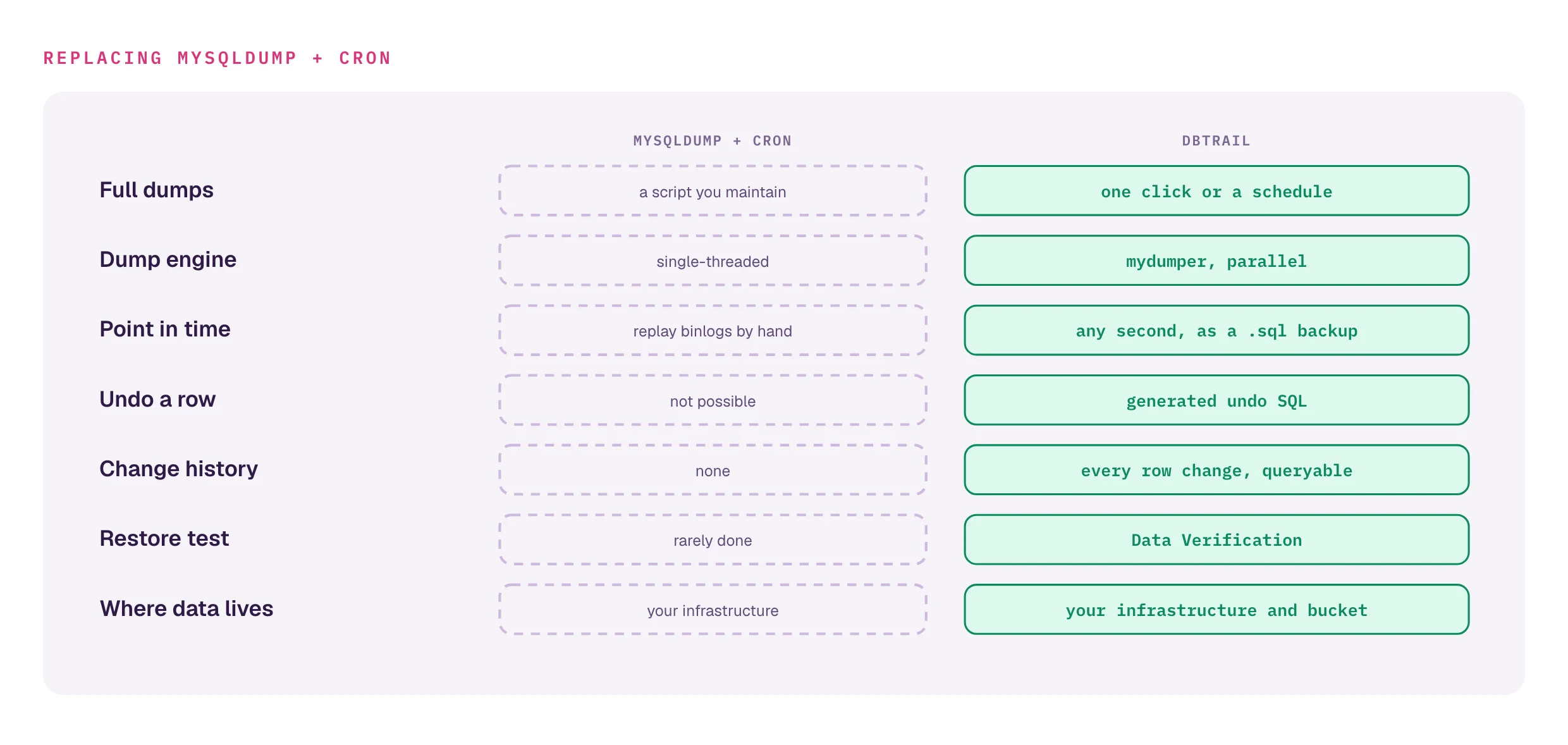
If you're running mysqldump + cron today, dbtrail replaces it. You get parallel logical dumps, continuous binlog streaming, per-row point-in-time recovery, and a queryable change history — in one system.
How dbtrail backs up your database
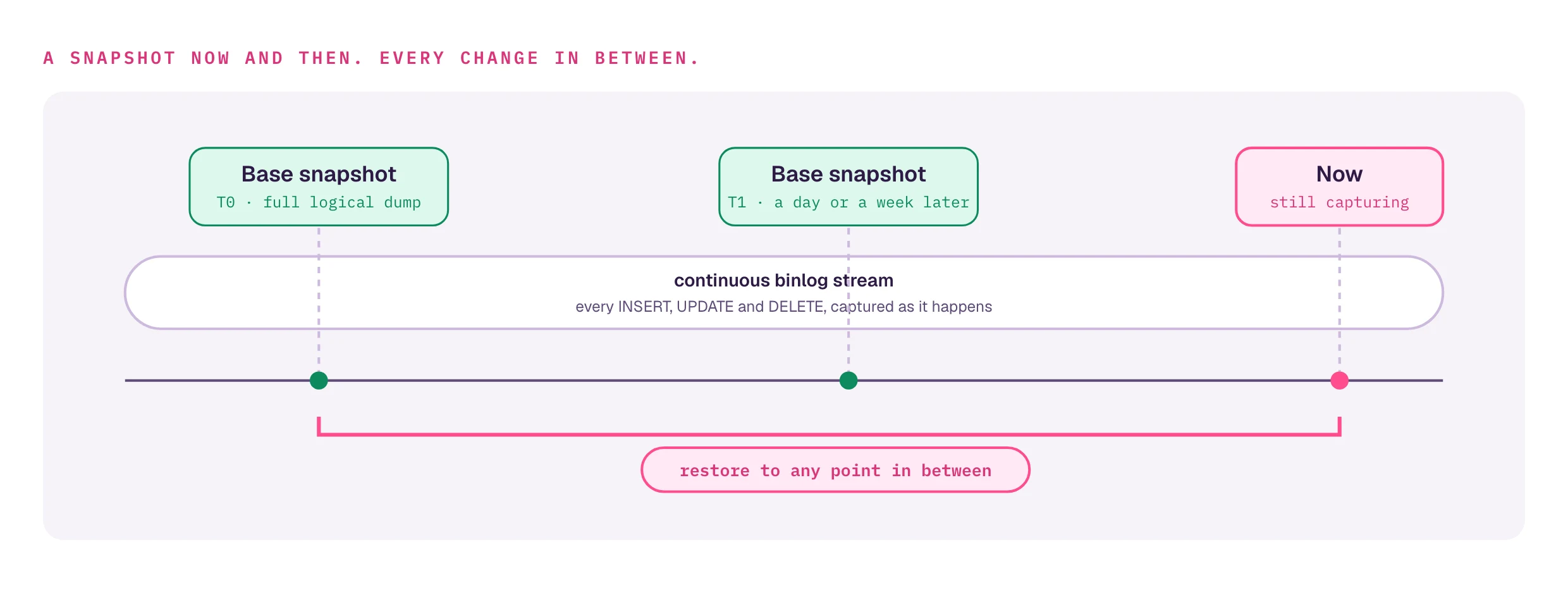
dbtrail takes two things and combines them into a complete backup system:
- Full base snapshots — taken on a schedule with mydumper (parallel logical dumps). Each snapshot is uploaded to S3 and embeds the exact binlog position and GTID set at the time of the dump.
- Continuous binlog streaming — the agent registers as a MySQL replica and captures every INSERT, UPDATE, and DELETE in real time. Events are indexed for instant query and archived as Parquet for long-term retention.
[Base snapshot T0] ─── continuous binlog stream ───> [Base snapshot T1] ─── stream ───> [now]
│ │ │ │
│ Every change │ │ Every change │
│ captured as it │ │ captured as it │
│ happens │ │ happens │
│ │ │ │
└── Restore to any point ──┴── Restore to any point ──┴── Restore to any pointTogether, these give you point-in-time recovery to any moment after the earliest available base snapshot — not just to the last nightly cron.
Why both pieces matter
A base snapshot by itself is stale the moment it's taken. A binlog stream by itself has no starting point — reconstructing state from a stream of deltas requires knowing what came before. dbtrail maintains both automatically so you never have to think about the gap.
Snapshot frequency
More frequent snapshots = faster point-in-time recovery (less binlog to replay). A weekly snapshot is fine for most workloads; daily is a typical choice for production databases on Pro and above. Continuous streaming covers everything between snapshots.
Scheduled backups
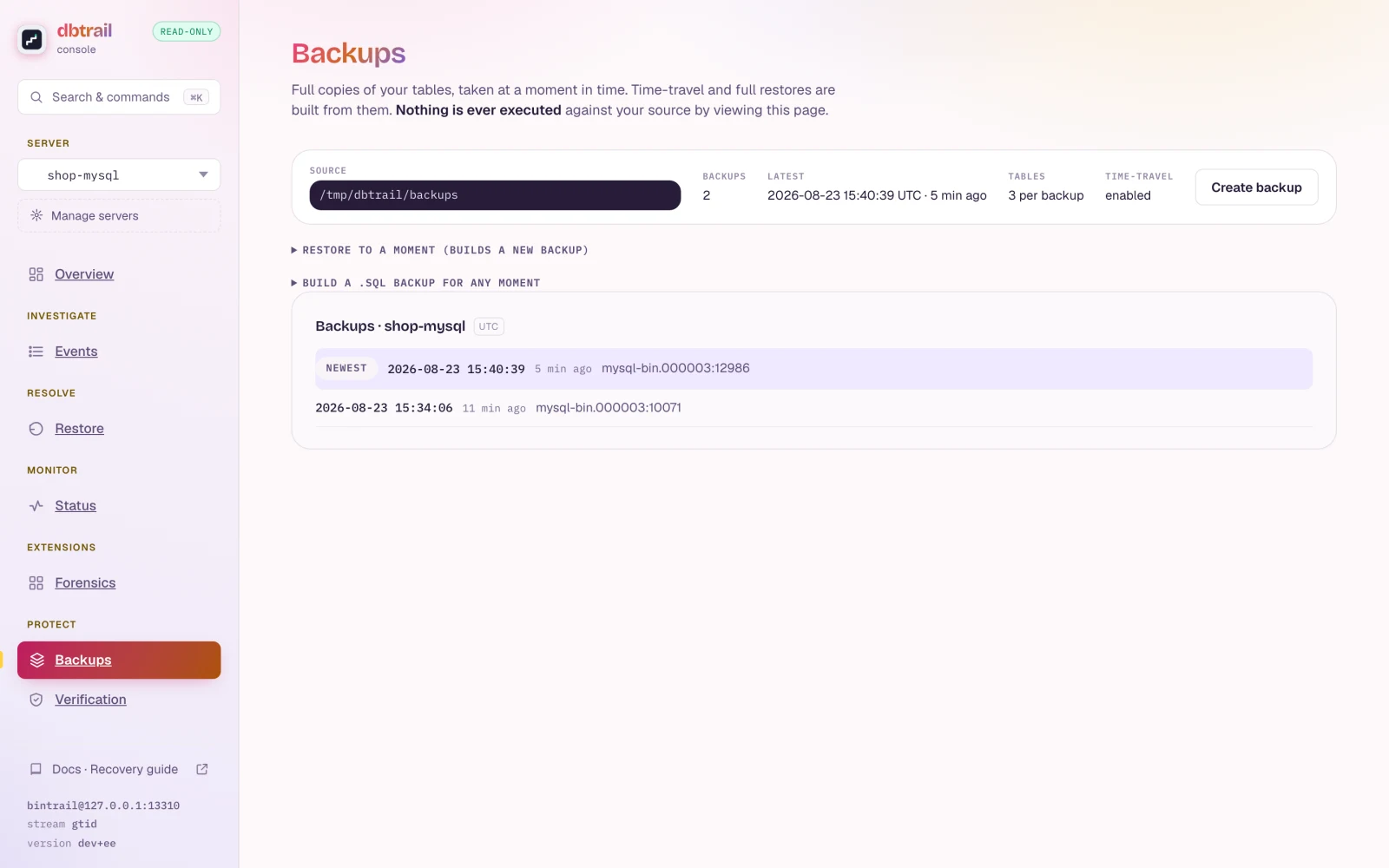
Create a backup schedule from the dashboard (Dashboard → Backups → New Schedule) or via the API:
| Setting | Description | Default |
|---|---|---|
| Cron expression | When the snapshot runs (e.g., 0 2 * * * for 2 AM daily) | — |
| Backup tool | mydumper (the only currently supported engine) | mydumper |
| Retention (days) | How long snapshots are kept in S3 (1–365) | 30 |
| S3 prefix | Custom path within the tenant's S3 namespace | Auto-generated |
Schedules can be enabled or disabled without deleting them. The dashboard shows the last run status and full history with duration, size, and error details. Schedules persist across agent restarts and plan changes.
Default retention by plan (applies to both change history and snapshots)
| Plan | Default retention |
|---|---|
| Free | 7 days |
| Pro | 30 days |
| Premium | 90 days |
| Enterprise | 365 days or custom |
This number caps two separate things that match by default but are configured independently:
- Change history (indexed binlog events + Parquet archives) — pruned automatically by the per-tenant retention worker once events age past the plan limit.
- Backup snapshot retention (
retention_dayson each schedule, 1–365 days) — stored with the schedule and intended to be applied via an S3 lifecycle policy on your backup bucket. Server-side enforcement ofretention_daysfor mydumper snapshots isn't wired yet; until it is, configure a matching lifecycle rule on the bucket.
On-demand backups
Trigger a snapshot at any time — useful before a risky migration, schema change, or large data import:
curl -X POST https://api.dbtrail.com/api/v1/backup \
-H "Authorization: Bearer bt_live_YOUR_API_KEY" \
-H "Content-Type: application/json" \
-d '{"server_id": "your-server-uuid"}'The call returns immediately with a backup_id you can poll for progress.
How dbtrail implements the snapshot step
The agent on each EC2 instance (which also runs the bintrail CLI for streaming and recovery) invokes mydumper directly for full control over dump options and error handling. Mydumper splits the dump across multiple threads (default: 4), which is significantly faster than single-threaded mysqldump on large databases.
Snapshot-step options:
- Schema/table filtering — snapshot specific schemas or tables instead of the entire server
- Compression — dump output is compressed to shrink S3 storage cost
S3 layout
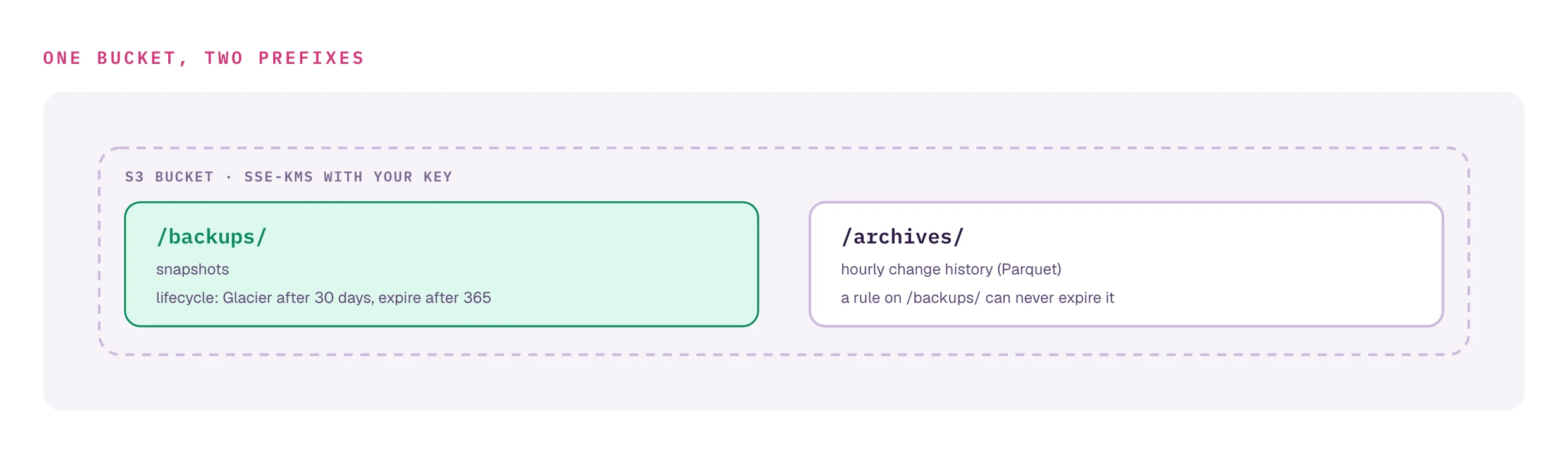
Snapshots are uploaded to S3 under a /backups/ prefix inside the shared archive bucket, with tenant and server segments:
s3://<bucket>/backups/<tenant>/<server-name>/2026-03-13/141500/This keeps backups organized per tenant and server, with date-based directories for browsing and retention management, and lives in the same bucket as the binlog event archives.
BYOS: your data stays in your S3 bucket
On the In Your VPC deployment model (Premium and above), the agent runs in your network and writes Parquet binlog archives directly to an S3 bucket you own. The SaaS control plane only sees the metadata index (table, event type, PK, timestamp) over the agent WebSocket — row data never leaves your AWS account:
- Binlog event archives remain in your AWS account (you control the KMS key, bucket policy, and lifecycle)
- dbtrail cannot read your row data — the SaaS side only sees aggregate metadata used for query routing and coverage tracking
- You can revoke access instantly by disabling the bucket policy; streaming and archiving continue locally on the agent
Scheduled snapshots are hosted-only today
The scheduled-backup features described above (POST /api/v1/backup, POST /api/v1/schedules) are currently restricted to the Cloud deployment mode — BYOS tenants receive a 422 byos_not_supported response. The Backups on BYOS section below explains the customer-side recipe; full SaaS-managed schedules for BYOS are a roadmap item.
See the Local Agents guide for setup and the security overview for the full trust boundary.
Backups on BYOS
On the In Your VPC deployment (BYOS), dbtrail does not run snapshots against your MySQL — the SaaS control plane has no inbound path into your network. The hosted endpoints return 422 byos_not_supported:
$ curl -X POST https://api.dbtrail.com/api/v1/backup \
-H "Authorization: Bearer bt_live_..." \
-d '{"server_id": "..."}'
{"detail": "BYOS mode: backup operations are delegated to the customer's agent",
"error_code": "byos_not_supported"}Instead, you take snapshots locally by running mydumper directly on a host that can reach MySQL (typically the same host as the agent). The binlog stream the agent is already capturing covers everything between snapshots, so the end-to-end PITR story is the same as on Cloud — you just own the snapshot step.
The model
[Local mydumper snapshot] + [agent's continuous binlog stream] = full PITR coverage
│ │
↓ ↓
your S3 bucket your S3 bucket (Parquet archives, agent-managed)Both pieces live side-by-side in your S3 bucket; dbtrail's control plane only sees indexed metadata over the agent WebSocket.
One-off snapshot
Run this on any host with network access to your MySQL. It uses the replication user you already created for the agent (step 2 of Local Agents):
TS=$(date -u +%Y%m%dT%H%M%S)
DUMP_DIR=/var/backups/bintrail/$TS
mkdir -p "$DUMP_DIR"
mydumper \
--host 127.0.0.1 --port 3306 \
--user bintrail --password "$BINTRAIL_PASSWORD" \
--outputdir "$DUMP_DIR" \
--threads 4 \
--regex '^(?!(mysql|sys|performance_schema|information_schema)\.)' \
--sync-thread-lock-mode NO_LOCK
# Sync the whole dump directory — the metadata file matters for PITR (see below).
aws s3 sync "$DUMP_DIR" "s3://my-company-dbtrail/backups/<server-id>/$TS/"Notes:
--sync-thread-lock-mode NO_LOCKskipsLOCK INSTANCE FOR BACKUP/FLUSH TABLES WITH READ LOCK. dbtrail's binlog stream already provides consistency, so the lock isn't needed and avoids requiringBACKUP_ADMIN/RELOAD. (This matches what the hosted agent does — seeagent/handler/dump.go.)- The
--regexexcludes MySQL system schemas. To dump only specific databases, replace it with e.g.--regex '^(app|analytics)\..*'. aws s3 syncuploads the whole directory, including themetadatafile. Do not sync just the.sqlfiles — see the PITR note below.
Scheduling with cron
Wrap the command above in /usr/local/bin/bintrail-backup.sh and schedule it:
sudo tee /usr/local/bin/bintrail-backup.sh > /dev/null <<'EOF'
#!/usr/bin/env bash
set -euo pipefail
# Load credentials from the same env file the agent uses.
# shellcheck disable=SC1091
source /etc/bintrail/agent.env
TS=$(date -u +%Y%m%dT%H%M%S)
DUMP_DIR=/var/backups/bintrail/$TS
S3_PREFIX=s3://my-company-dbtrail/backups/${BINTRAIL_SERVER_ID}/$TS/
mkdir -p "$DUMP_DIR"
mydumper \
--host "${MYSQL_HOST:-127.0.0.1}" --port "${MYSQL_PORT:-3306}" \
--user "${MYSQL_USER:-bintrail}" --password "${MYSQL_PASSWORD}" \
--outputdir "$DUMP_DIR" \
--threads 4 \
--regex '^(?!(mysql|sys|performance_schema|information_schema)\.)' \
--sync-thread-lock-mode NO_LOCK
aws s3 sync "$DUMP_DIR" "$S3_PREFIX"
# Local retention: keep 3 most recent dumps on disk.
ls -1dt /var/backups/bintrail/*/ | tail -n +4 | xargs -r rm -rf
logger -t bintrail-backup "snapshot uploaded to $S3_PREFIX"
EOF
sudo chmod 750 /usr/local/bin/bintrail-backup.sh
sudo chown root:bintrail /usr/local/bin/bintrail-backup.shThen add a crontab entry (daily at 02:00 UTC):
# crontab -e
0 2 * * * /usr/local/bin/bintrail-backup.sh >> /var/log/bintrail-backup.log 2>&1Or, if you prefer systemd timers:
# /etc/systemd/system/bintrail-backup.service
[Unit]
Description=Bintrail nightly snapshot
[Service]
Type=oneshot
ExecStart=/usr/local/bin/bintrail-backup.sh# /etc/systemd/system/bintrail-backup.timer
[Unit]
Description=Run bintrail-backup nightly
[Timer]
OnCalendar=*-*-* 02:00:00 UTC
Persistent=true
[Install]
WantedBy=timers.targetsudo systemctl daemon-reload
sudo systemctl enable --now bintrail-backup.timerPITR: keep the metadata file
After every run, mydumper writes a metadata file into the output dir that looks like:
Started dump at: 2026-05-19 02:00:01
SHOW MASTER STATUS:
Log: mysql-bin.000148
Pos: 197834521
GTID:5d8e...:1-9421317
Finished dump at: 2026-05-19 02:01:44This is the input to point-in-time recovery: it tells dbtrail where to start replaying binlog events from. The aws s3 sync above already uploads it because it copies the whole directory — but if you customize the upload step (e.g. piping only *.sql files through compression), make sure metadata still ends up next to the dump in S3. Without it, PITR can only restore to the dump-finish moment, not to a precise later target time.
See the PITR guide for how the snapshot + binlog stream combine on restore.
Encryption and retention
- Encryption in transit/at rest — use a customer-managed KMS key on the destination bucket (SSE-KMS) so encryption is automatic on
aws s3 sync. mydumper also supports--encrypt-key-filefor on-disk encryption if you need defense-in-depth before upload. - Retention — set an S3 lifecycle policy on the backups prefix (e.g. transition to Glacier after 30 days, expire after 365). The script above already prunes local copies to bound disk usage.
- Bucket layout — keep snapshots and the agent's Parquet archives in different prefixes of the same bucket so a lifecycle rule on
/backups/doesn't accidentally expire your binlog archives.
What's coming
A future SaaS-managed BYOS backup flow will let you register the bintrail-backup.sh step with dbtrail so the dashboard shows backup history, retention status, and integrates with the existing PITR UI. Until then, this is a customer-managed workflow.
Restore
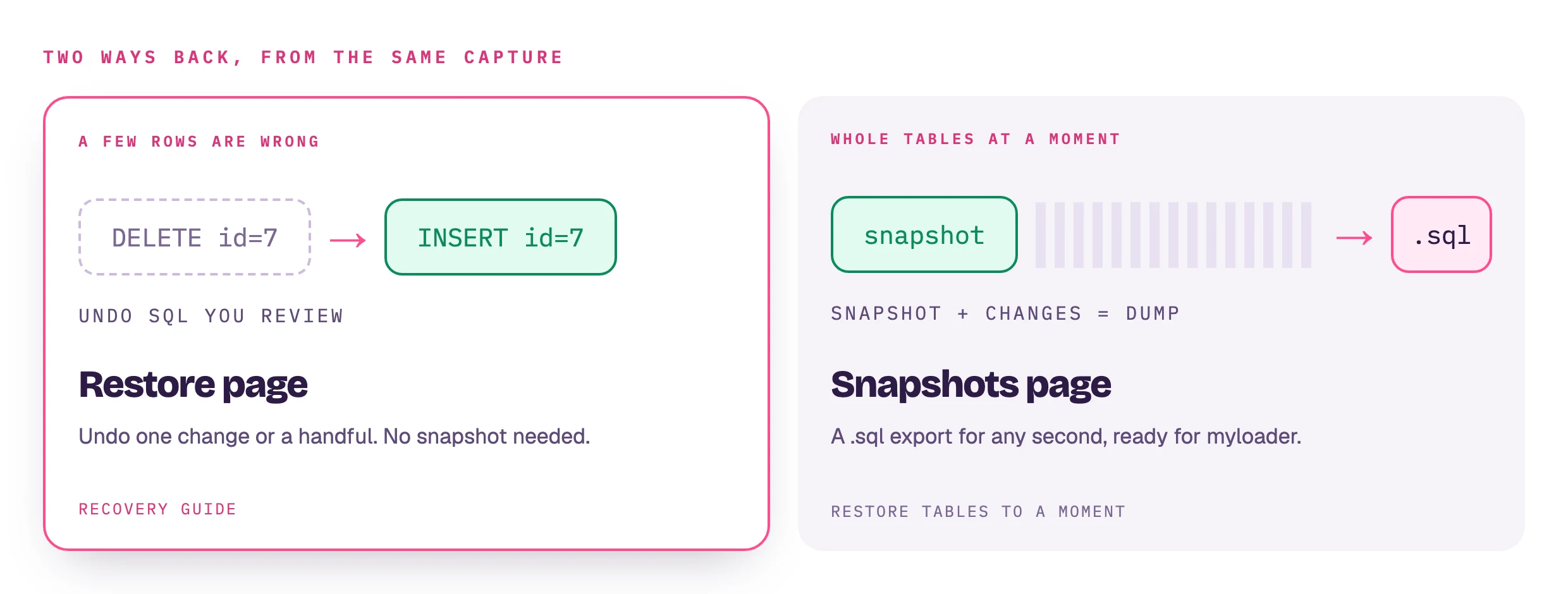
The restore side of dbtrail is covered in two places depending on what you need:
- Row-level recovery — undo a specific DELETE, revert an UPDATE, or remove an unintended INSERT. Generates dry-run SQL you review before applying. See the recovery guide.
- Point-in-time restore of whole tables or the whole database — reconstruct the full state at any past moment by combining a base snapshot with binlog events up to the target time. Output is a standard mydumper dump you can import anywhere. See the PITR guide.
Both restore paths are surfaced as first-class flows in the dashboard (and exposed to Claude via MCP). dbtrail intentionally never executes writes against your MySQL — you always review and apply the output yourself.
Claude is the recommended way to restore
Ask Claude: "Restore the orders table to 3 PM yesterday" or "Undo the DELETE on user 12345". Claude calls the right dbtrail tool and shows you the generated SQL for review. The dashboard and API provide the same restore operations directly if you prefer them — Claude is optional.
Compared to DIY mysqldump + cron
If you're migrating from a cron-driven dump setup, here's what dbtrail replaces and adds:
| Capability | mysqldump + cron | dbtrail |
|---|---|---|
| Scheduled full dumps | Manual script | Managed schedule with status, retry, history |
| Parallel dump engine | Single-threaded | Mydumper, multi-threaded |
| S3 upload | Manual (aws s3 cp) | Built in, tenant-prefixed path |
| Retention enforcement | Manual cleanup script | Change-history pruned by worker; snapshots via S3 lifecycle |
| Point-in-time recovery | Manual binlog replay | One-click or API; dbtrail picks the right baseline |
| Change history queries | — | Every row change indexed and queryable (SQL, dashboard, Claude) |
| Row-level recovery | — | Generates inverse SQL for a single row |
| Forensics (who changed what) | — | who_changed, user_activity, connection_history — hosted with performance_schema enabled |
| Monitoring | DIY | Dashboard + status API (alerting is DIY on top of the status API) |
| BYOS (data stays in your VPC) | You already own everything | Supported on Pro+ |
mysqldump still has its place for one-off exports, but the continuous-protection story it can't tell is where dbtrail lives.
Best practices
-
Snapshot at least as often as your binlog retention. If MySQL purges binlogs after 7 days, snapshot at least weekly so you always have a baseline inside the retention window.
-
Test your restores. A backup you've never restored is a backup you can't trust. Use the PITR guide to validate end-to-end against a staging MySQL periodically.
-
Monitor backup status. Check the dashboard or wire the status API into your monitoring. A silently failing schedule is worse than no schedule — it creates a false sense of security.
-
Keep at least two retention cycles. If you snapshot weekly with 30-day retention, you'll always have ~4 good baselines. If one is corrupted, you have fallbacks.
-
Lock down your S3 bucket. Dumps are stored at rest in the tenant-prefixed S3 path and may be accessed by multiple team members. Restrict the bucket to least-privilege IAM and enable SSE; for BYOS, use a customer-managed KMS key.
Next steps
- Point-in-time recovery — reconstruct your database to any past moment
- Recovery guide — generate SQL to reverse specific row-level changes
- Stream configuration — configure binlog streaming, filtering, and checkpoints
- Server configuration — connect dbtrail to your MySQL database
- Backups API reference — endpoint details for programmatic scheduling