dbtrail
Guides

Recovery

Restore accidentally changed rows to any past moment — row-level point-in-time recovery with human-in-the-loop review

Recovery is dbtrail's row-level point-in-time restore. When a single row (or a handful of rows) is wrong — a deleted customer, a reverted UPDATE, an unintended INSERT — you don't need to restore a whole database. dbtrail indexes every row change, so you can pick any moment in the past and restore that specific row to its state at that moment.

Row-level vs. whole-database restore

  • Use recovery (this guide) to restore specific rows — typical for "I just deleted the wrong user" type incidents.
  • Use PITR to reconstruct whole tables or the whole database at a target time — typical for schema-wide corruption, large accidental batch operations, or cloning for audit.

Both reach into the same underlying binlog index and base snapshots, just at different granularities.

Human-in-the-loop by design

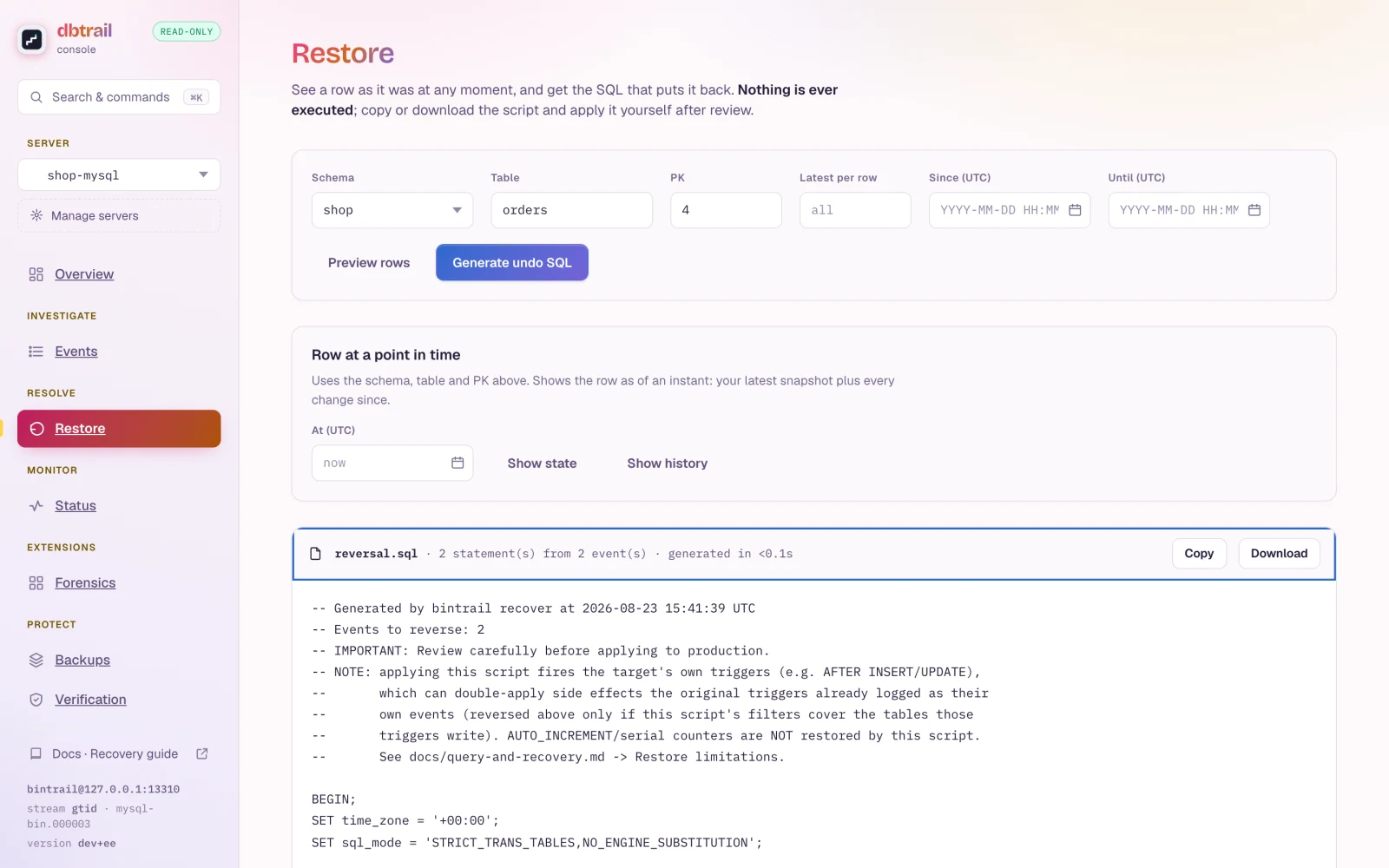
Recovery always operates in dry-run mode — dbtrail generates the SQL but never executes it against your database. A human reviews the statements and applies them. This is deliberate: an automated writer that misreads intent would be a bigger incident than the one it was trying to fix. The review step is the safety feature.

How recovery works

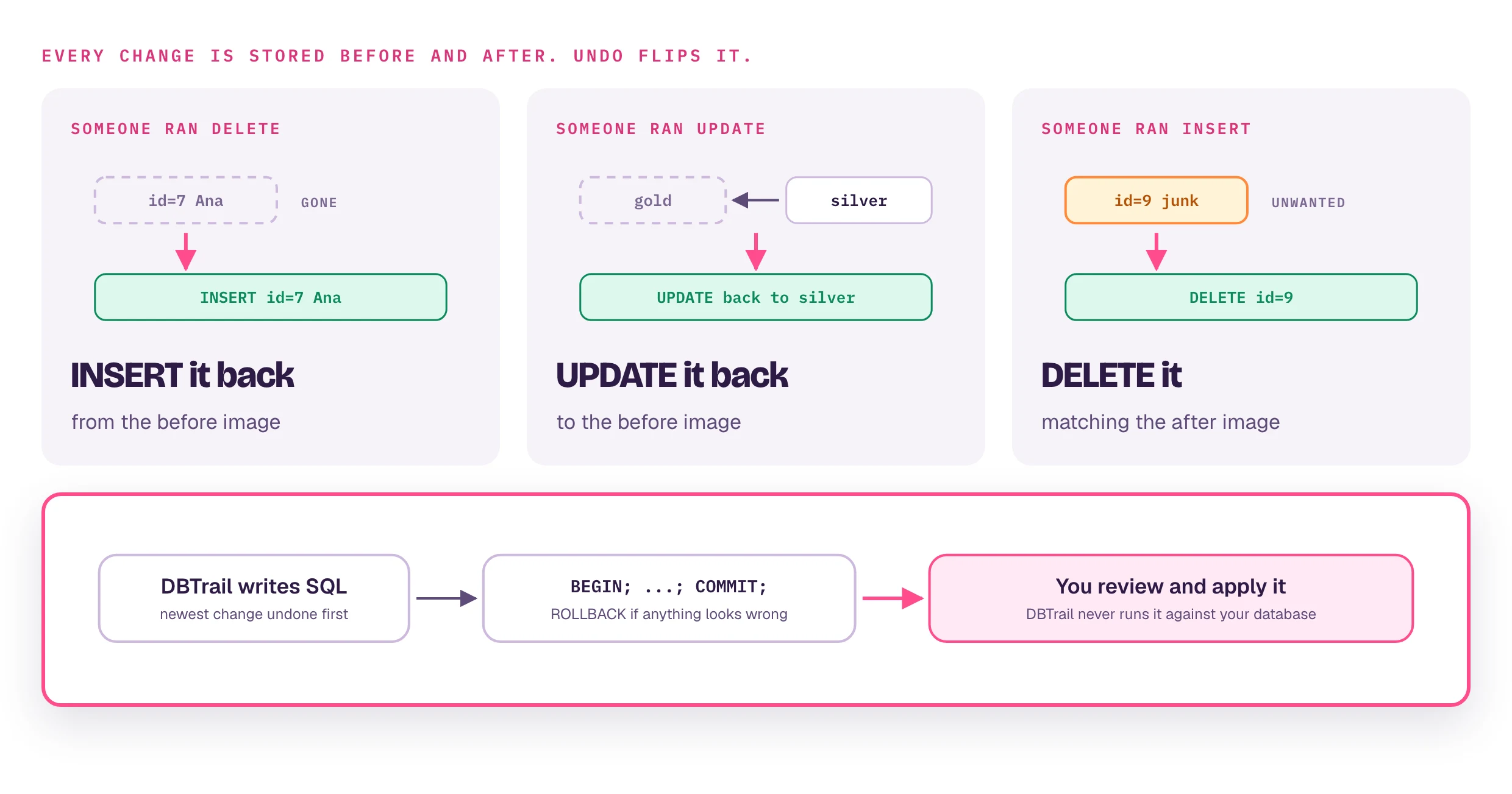
dbtrail indexes the full before/after state of every row change. These before/after row images are captured by the bintrail CLI as it parses MySQL binary log events. When you request recovery, dbtrail uses this data to generate the inverse SQL:

Original eventRecovery action
DELETEINSERT INTO ... using the row_before values
UPDATEUPDATE ... SET reverting to row_before values
INSERTDELETE FROM ... matching the row_after values

Matching events are reversed in reverse chronological order — the most recent change is undone first — and the whole script is wrapped in BEGIN/COMMIT so you can ROLLBACK if a statement fails mid-way. The generated SQL uses primary-key-only WHERE clauses when a schema snapshot is available, falling back to all-columns WHERE otherwise.

Foreign key awareness

The open-source generator does not consult the schema's foreign-key graph — ordering is strictly reverse-chronological. Because MySQL enforces FK order on the original deletes (children before parents), undoing them most-recent-first re-inserts parents before children, as long as all the related deletions fall inside your filters. If a referenced parent row was deleted outside the window you're recovering, the generated INSERTs can violate FK constraints — widen the time window, or recover the parent row first.

dbtrail Cloud

dbtrail Cloud recovery is FK-aware by default: it resolves deleted parent rows recursively (resolve_fk, up to 5 levels), optionally includes deleted child rows (include_dependents), topologically sorts the statements so parents are always restored before children, and wraps circular or self-referencing FKs with SET FOREIGN_KEY_CHECKS=0 / SET FOREIGN_KEY_CHECKS=1. See the Recover API reference for details and response format.

MySQL 8.x CASCADE limitation

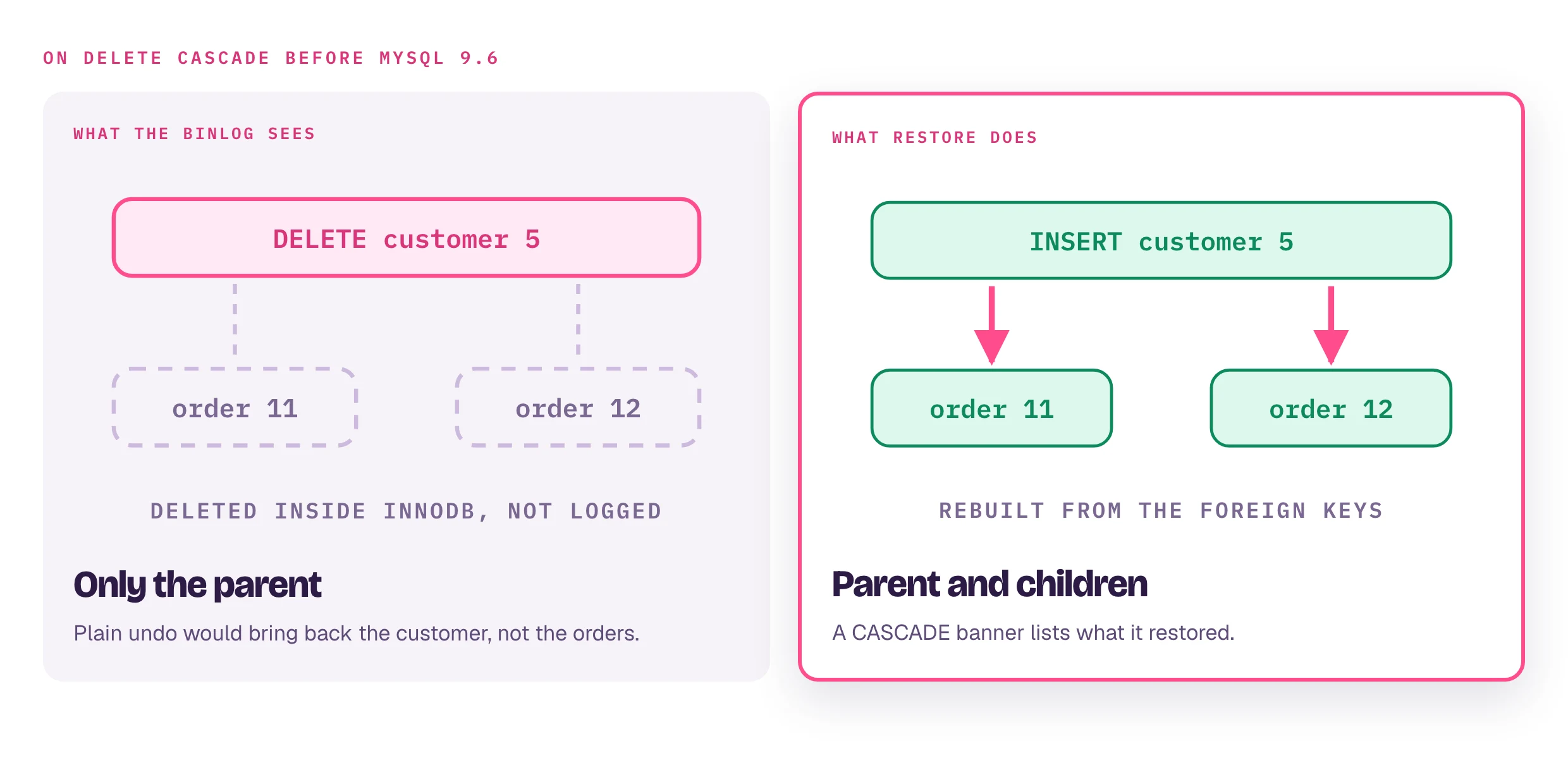
ON DELETE CASCADE is invisible to the binlog on MySQL 8.x

When a parent row is deleted and the foreign key uses ON DELETE CASCADE, InnoDB handles the child deletions entirely inside the storage engine — they never appear in the binary log. This is a MySQL/InnoDB limitation, not a bintrail or dbtrail limitation. Since bintrail reads the binlog, cascaded child deletions are invisible to both query and recover.

This means:

  • Cascaded child deletions never reach the index — there are no binlog events to capture, so no recovery interface (CLI, console, or Cloud FK resolution) can discover them
  • Querying the child table for recent DELETEs will not show CASCADE deletions
  • Only the parent DELETE is visible to dbtrail

bintrail doctor warns when monitored schemas carry CASCADE constraints, and ingestion enforces it hard: stream/watch/up refuse to start while they exist.

Workaround: Replace ON DELETE CASCADE with ON DELETE RESTRICT and handle child deletions explicitly in application code or a BEFORE DELETE trigger on the parent table. Explicit DELETEs are logged in the binlog and fully visible to dbtrail.

MySQL 9.6+: This limitation is resolved — cascade enforcement was moved to the SQL layer, making cascaded operations visible to the binlog.

Using recovery

The fastest way to recover a row is to ask Claude in plain English:

"Generate recovery SQL for the deleted order 12345 in the orders table"

"Undo the UPDATE on user 42 from yesterday around 3 PM"

Claude calls the recover tool and shows you the generated SQL for review. You apply it (or not) — dbtrail never writes to your database itself. This works the same whether Claude is connected to the local bintrail-mcp server (open source) or to the dbtrail Cloud MCP gateway.

Claude is the recommended interface for recovery because the natural-language flow maps directly to how incidents actually come up ("a customer said their profile got wiped yesterday afternoon"). See Connect Claude to wire it up.

Via the CLI

The bintrail recover command queries the index and generates the reversal script directly:

# Preview reversal SQL for one row (prints to stdout)
bintrail recover --index-dsn "user:pass@tcp(127.0.0.1:3306)/binlog_index" \
  --schema mydb --table orders --pk '12345' --event-type UPDATE \
  --dry-run

# Recover deleted rows in a time window, writing a script to review and apply
bintrail recover --index-dsn "..." \
  --schema mydb --table orders --event-type DELETE \
  --since "2026-02-19 14:00:00" --until "2026-02-19 14:05:00" \
  --output recovery.sql

# Reverse an entire transaction by GTID
bintrail recover --index-dsn "..." \
  --gtid "3e11fa47-71ca-11e1-9e33-c80aa9429562:42" \
  --output recovery.sql

One of --output or --dry-run is required — the command never applies SQL itself.

Via the web UI

  • Open source — the console (bintrail-console serve, default http://127.0.0.1:8090) has a Recover tab: filter by schema, table, primary key, and time, preview the affected rows with before/after diffs, then copy or download the transaction-wrapped script. The console never executes SQL. The same engine is also reachable as POST /api/recover behind the console's opt-in API token.
  • dbtrail Cloud — the Dashboard → Query page surfaces a Recover button on any row change event. Same output as the API, with a diff view so you can see before/after values inline.

Via the API

dbtrail Cloud exposes recovery as a REST endpoint for programmatic access — useful for integrating recovery into your own runbooks. It returns the generated SQL, an affected row count, and a list of operations. See the Recover API reference for full request/response details.

Recovery parameters

bintrail recover accepts the following flags:

FlagDescription
--index-dsnDSN of the index MySQL database (required)
--schema, --tableFilter by schema and table name
--pkPrimary key value(s), pipe-delimited for composite PKs; requires --schema and --table
--pksMultiple primary key values (comma-separated, or repeat the flag); mutually exclusive with --pk
--limit-per-pkCap reversed events per PK to the latest N; requires --pk or --pks
--event-typeFilter by INSERT, UPDATE, or DELETE
--gtidFilter by GTID (e.g. uuid:42) — reverses an entire transaction
--since, --untilTime window, 2006-01-02 15:04:05 format
--column-eqOnly events where a column in row_before/row_after equals a value (column=value, repeat for AND)
--no-archiveDisable auto-routing to Parquet archives (MySQL-only results)
--flagFilter events from tables or columns carrying a flag (see bintrail flag list)
--outputWrite the recovery SQL to this file (required unless --dry-run)
--dry-runPrint the recovery SQL to stdout instead of writing a file
--limitMaximum number of events to reverse (default 1000)
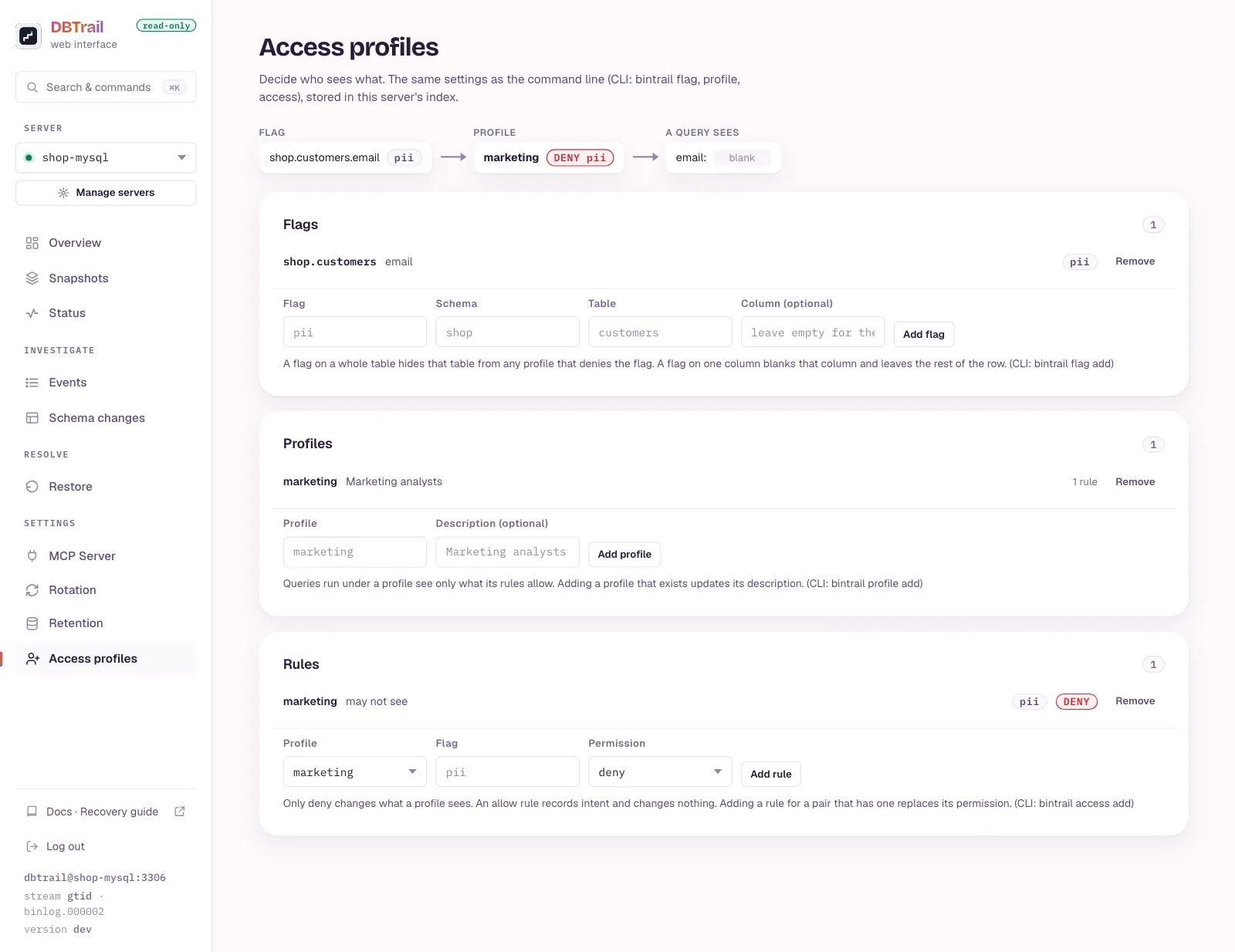
--profileApply access rules for a profile (table-level deny, column-level redaction)
--formatOutput format: text or json

The dbtrail Cloud Recover API and MCP recover tool accept equivalent parameters (server_id, schema, table, primary_keys, target_time), plus the Cloud-only FK options resolve_fk and include_dependents.

Best practices

  1. Always review the SQL before executing — recovery SQL can have unintended side effects if the data has changed since the original event
  2. Use specific filters — narrow down by table, primary key, and time range to avoid generating more statements than needed
  3. Test in a staging environment first when recovering large batches
  4. Run inside a transaction — the generated SQL is already wrapped in BEGIN/COMMIT, so you can ROLLBACK if something looks wrong

dbtrail Cloud

In dbtrail Cloud, recovery is gated by RBAC: it requires the recover:execute permission, available to owners, admins, and operators. See Team management.

On this page