
Troubleshooting
Fix a server that will not connect, a copy that will not open in DuckDB, and capture that looks wrong.
Setting up a server
Check and connect lists each problem with its fix. Fix it and press Check and connect again.
The SQL for DBTrail's user
The add-server form shows this SQL with a password filled in. Here the password is left out on purpose: put your own in quotes.
CREATE USER 'dbtrail'@'%' IDENTIFIED BY <choose a password>;
-- Created it already on an earlier try? Run this instead of CREATE USER:
-- ALTER USER 'dbtrail'@'%' IDENTIFIED BY <choose a password>;
GRANT REPLICATION SLAVE, REPLICATION CLIENT, SELECT ON *.* TO 'dbtrail'@'%';
-- Snapshots (point-consistent by default). SHOW VIEW lets the snapshot copy views.
-- BACKUP_ADMIN is MySQL/Percona 8.0 or later. On MySQL 5.7 run this instead:
-- GRANT RELOAD, SHOW VIEW ON *.* TO 'dbtrail'@'%';
GRANT RELOAD, BACKUP_ADMIN, SHOW VIEW ON *.* TO 'dbtrail'@'%';
-- On Amazon RDS, Aurora or Cloud SQL, run this line instead of the GRANT RELOAD line above.
-- GRANT LOCK TABLES, SHOW VIEW ON *.* TO 'dbtrail'@'%';
On MariaDB or MySQL 5.7, run CREATE USER on its own first and check it worked:
there, a GRANT to a missing user can create it with no password.
binlog_row_image is not FULL
Set it in your MySQL configuration and restart:
[mysqld]
binlog_row_image = FULL
Can't reach a MySQL on the DBTrail machine
Use host host.docker.internal. On Linux, that MySQL must listen on more than
127.0.0.1.
Stops at Schema access on an empty MySQL
Nothing to read yet. Create a table, then check again:
CREATE DATABASE IF NOT EXISTS dbtrail_test;
CREATE TABLE dbtrail_test.ping (id INT PRIMARY KEY);
A table without a primary key
At the first connect, one such table stops capture for the whole server. A table created later without one is only left out, and named on the Overview under Table coverage. Tables that are not InnoDB are left out too. Find them:
-- Tables not using InnoDB
SELECT TABLE_SCHEMA, TABLE_NAME, ENGINE
FROM information_schema.TABLES
WHERE TABLE_SCHEMA NOT IN ('mysql','information_schema','performance_schema','sys')
  AND ENGINE != 'InnoDB';

-- Tables without a primary key
SELECT t.TABLE_SCHEMA, t.TABLE_NAME
FROM information_schema.TABLES t
LEFT JOIN information_schema.TABLE_CONSTRAINTS c
  ON t.TABLE_SCHEMA = c.TABLE_SCHEMA
  AND t.TABLE_NAME = c.TABLE_NAME
  AND c.CONSTRAINT_TYPE = 'PRIMARY KEY'
WHERE t.TABLE_SCHEMA NOT IN ('mysql','information_schema','performance_schema','sys')
  AND t.TABLE_TYPE = 'BASE TABLE'
  AND c.CONSTRAINT_NAME IS NULL;
Add the key (ALTER TABLE ... ADD PRIMARY KEY (...), or ENGINE=InnoDB); on
large tables use pt-online-schema-change
or gh-ost.
Amazon RDS and Aurora
- In a custom DB parameter group:
binlog_format = ROW,binlog_row_image = FULL. Reboot if it showspending-reboot. - Keep binlogs 24 hours:
CALL mysql.rds_set_configuration('binlog retention hours', 24); GRANT rds_replicationinstead ofREPLICATION SLAVE, and theLOCK TABLESline instead ofRELOAD. Nothing else to set: DBTrail sees an RDS or Aurora address and reads withlock-allon its own, and behind your own name or an IP it tries again withlock-allwhen the first snapshot is refused.- Aurora Serverless v1 has no binlogs; v2 and provisioned Aurora work.
Forgot the web interface password
From the dbtrail folder:
docker compose exec -it bintrail bintrail-console user set-password
Querying the copy
Secret Validation Failure and no views
This machine has no AWS credentials DuckDB can find. Set them up, or open the copy another way: Query with DuckDB.
No files found that match the pattern ...
Run DuckDB from inside the folder the download created.
duckdb -ui says read_parquet cannot take NULL list
The browser UI is a new session. Run the SET VARIABLE line from the top of
views.sql again in the first cell, or name the snapshot:
SET VARIABLE bintrail_newest_snapshot = 's3://my-archives/baselines/2026-09-01T06-00-25Z/';HTTP 404 on _NEWEST, or does not hold a snapshot name
The file finds the newest snapshot through the _NEWEST object at the S3
location, and that object is gone or was edited. Download views.sql again:
a new file reads the location another way when _NEWEST is missing. The next
snapshot upload writes _NEWEST again.
Opening views.sql takes close to a minute
You are outside AWS on a DuckDB older than 1.5, which checks every file of the
copy one after another, each check crossing the internet. Upgrade DuckDB: 1.5
checks them all at once (about 9 s for 17 tables from a laptop). A views.sql
downloaded with an older DBTrail is slow on every version: download it again.
views.sql still shows the old data after an update
In a session that was already open, read the file again (.read views.sql).
Running only its first SET VARIABLE line is not enough.
A view says "Generate the views again"
The table changed since views.sql was made, or DBTrail was upgraded. Download
views.sql again. A view made before v0.84.0 can show an old table with no
error: download it again after upgrading.
An older backup with no views.sql inside
Take a views.sql from Settings → MCP Server and point it at the folder:
cd 2026-09-01T06-00-25Z
sed -E -e "s|glob\('.*/\*/_SUCCESS'\)|glob('_SUCCESS')|" \
       -e "s|read_text\('.*/_NEWEST'\)|(SELECT '2000-01-01T00-00-00Z' AS content)|" \
       -e "s|getvariable\('bintrail_newest_snapshot'\)|'./'|g" \
       ~/Downloads/views.sql > views-here.sql
duckdb -init views-here.sql lake.db
If the file names a folder outright (no SET VARIABLE), replace it,
current/ included:
sed 's|/var/lib/bintrail/baselines/prod/current/|/Users/me/backups/2026-09-01T06-00-25Z/|g' \
  views.sql > local.sql
Dashboards
- A view says it "reads the table file alone": it stops once an update writes changes beside that table. Download the views file again.
- Never read a copy made with
aws s3 sync: it can catch a half-copied snapshot with no error. Error loading shared library libstdc++.so.6: use the driver authors' Metabase image, step 3.- Step 2 stops naming a table: it left the newest snapshot. Download the views file again.
Capture
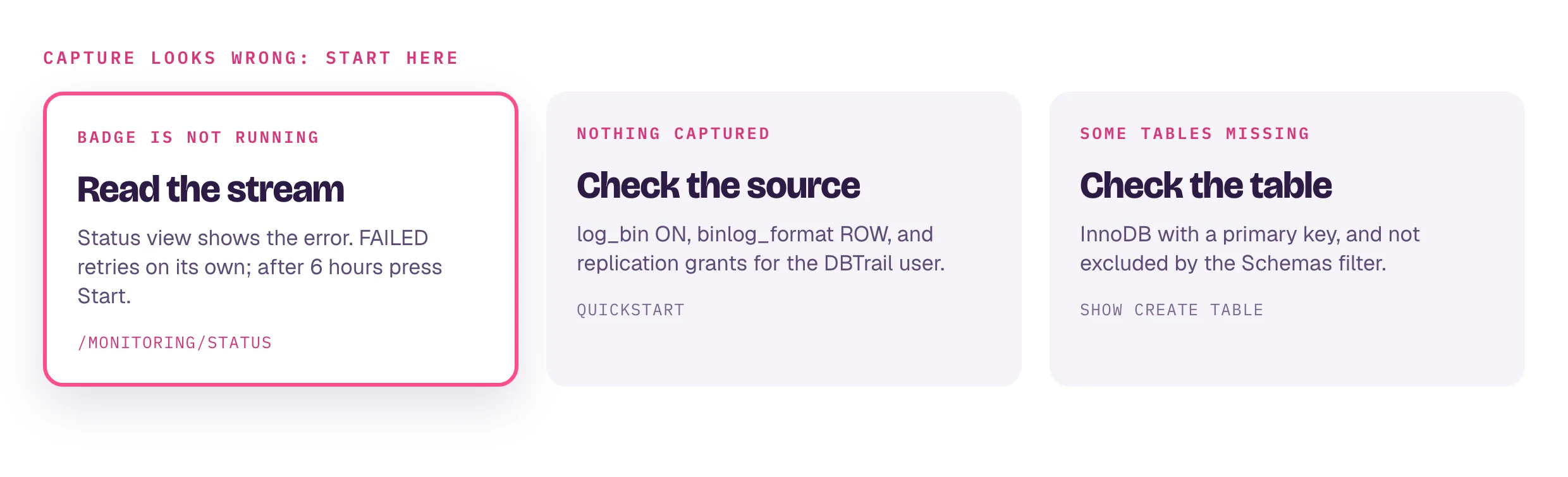
- Nothing captured, or nothing on the Overview a minute after a change.
Open Status. Check
log_binON,binlog_formatROW, the user's grants, and that Manage servers → Edit → Schemas is not excluding what you expect. - Some tables missing. They need a primary key and InnoDB: above.
FAILEDor disconnected. A restart or network cut. Capture retries and resumes where it stopped; after 6 hours of failing it stops, so fix the cause and press Start.- Capture keeps falling behind. The binlog arrow on the Overview says
falling behind and the lag on Status grows for
minutes while the machine sits mostly idle. First check the index MySQL's
memory:
bintrail doctorwarns Index buffer pool when it still runs with the 128 MB default. How to size it: Give the index MySQL memory. Then the source's write rate.
ProxySQL time-travel (Beta)
Every error the time-travel port returns, with its fix: ProxySQL integration for Flashback.
Getting help
- Issues or
discussions. Include the
version (bottom of the web interface's sidebar, or
bintrail --version), what you did and the error. SUPPORT.md says what is supported.