dbtrail
Guides

ProxySQL Time-Travel SQL

Query historical row state from any MySQL client by routing _flashback / _diff / _snapshot queries through ProxySQL to dbtrail

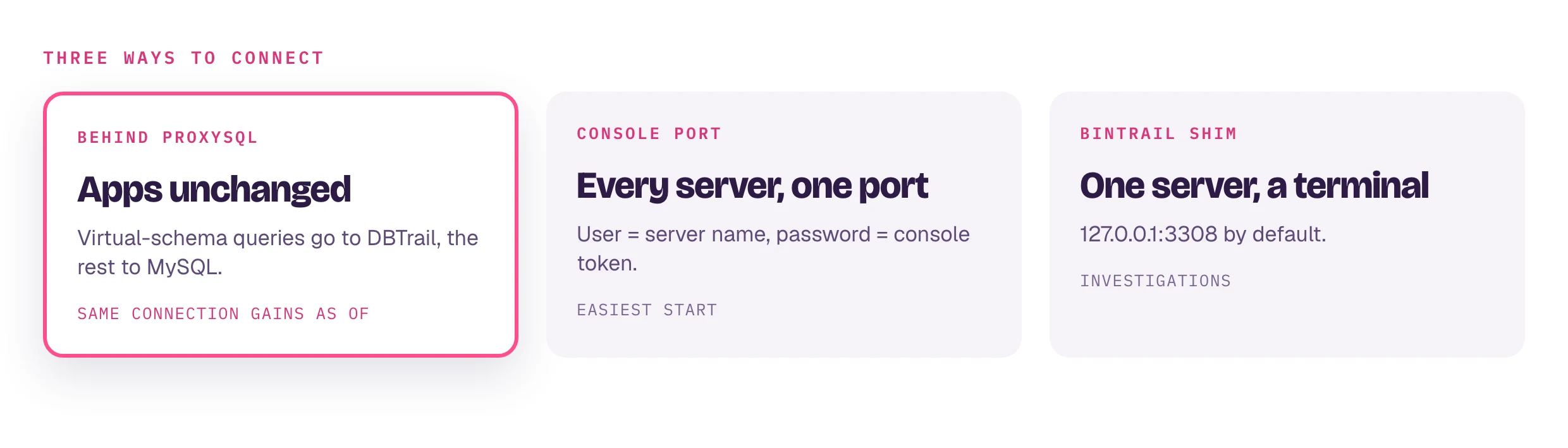
bintrail shim is a MySQL wire-protocol server that turns time-travel queries into reads against a local index DB populated from your MySQL binlog. Pair it with ProxySQL routing rules and any MySQL client — mysql, DBeaver, Metabase, an ORM, a BI tool — gets time-travel SQL with zero client integration.

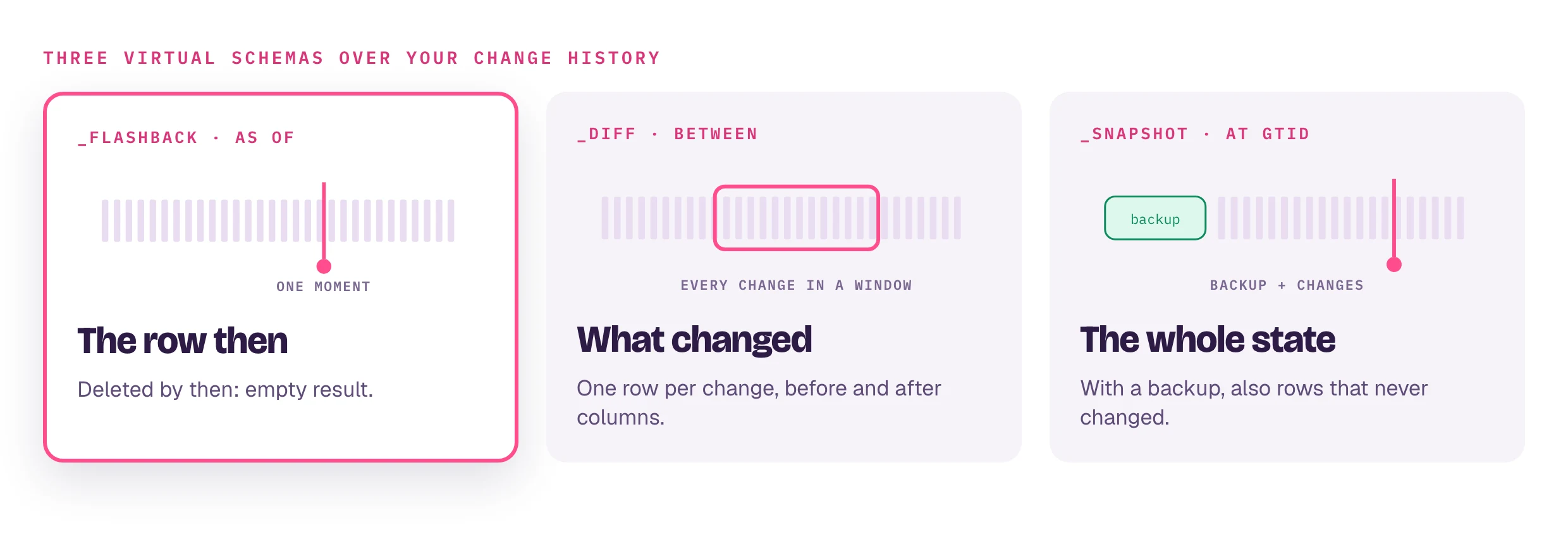
SELECT * FROM _flashback.orders AS OF '2026-04-27 09:00:00' WHERE id = 42;
SELECT * FROM _diff.orders BETWEEN '2026-04-27 09:00' AND '2026-04-27 10:00' WHERE id = 42;
SELECT * FROM _snapshot.orders AT GTID '3E11FA47-71CA-11E1-9E33-C80AA9429562:42' WHERE id = 1;

Beta

ProxySQL time-travel is in beta. The wire-protocol server, parser, schema cache, and safety guardrails are unit-tested, but end-to-end coverage against production MySQL clients is still in progress. Expect rough edges, breaking changes between releases, and limitations called out at the bottom of this page. Do not depend on it for incident-time recovery yet — use bintrail recover, the console, or MCP for those flows.

Requires a local bintrail index

The shim reads from a local bintrail_index MySQL schema populated by bintrail init + bintrail stream. Both the streamer and the shim must run on a host with network access to MySQL — typically the same host as ProxySQL.

dbtrail Cloud

On dbtrail Cloud, time-travel SQL works on Local Agents deployments only — in Cloud mode the index runs inside dbtrail's VPC and is not reachable from your network. Local Agents are available on Pro, Premium, and Enterprise. The shim itself needs no API key — but if you also want the dashboard, forensic search, and recover to see this server, run bintrail agent alongside the streamer: it authenticates with an API key (Settings → API Keys → Create in the dashboard) and needs a different --server-id from the streamer (both connect to MySQL as replicas). In BYOS deployments the agent can also keep the local index current itself, standing in for bintrail stream. For a ProxySQL-only setup the agent is optional — bintrail stream + bintrail shim is enough.

When to use it

  • Forensics over SQL. Investigators write SELECT … FROM _flashback.t AS OF '<ts>' WHERE id = ? instead of learning dbtrail's CLI/API.
  • Pre-flight recovery. A "what did this row look like 5 minutes ago?" check becomes a one-liner against your existing mysql shell.
  • BI and ad-hoc tools. Metabase, DBeaver, JetBrains DataGrip — anything that speaks MySQL — can query historical state without a plugin.
  • Composable with live SQL. With a follow-up release, you'll be able to JOIN a flashback row against a live lookup table; the beta keeps virtual-schema queries isolated for safety.

How it works

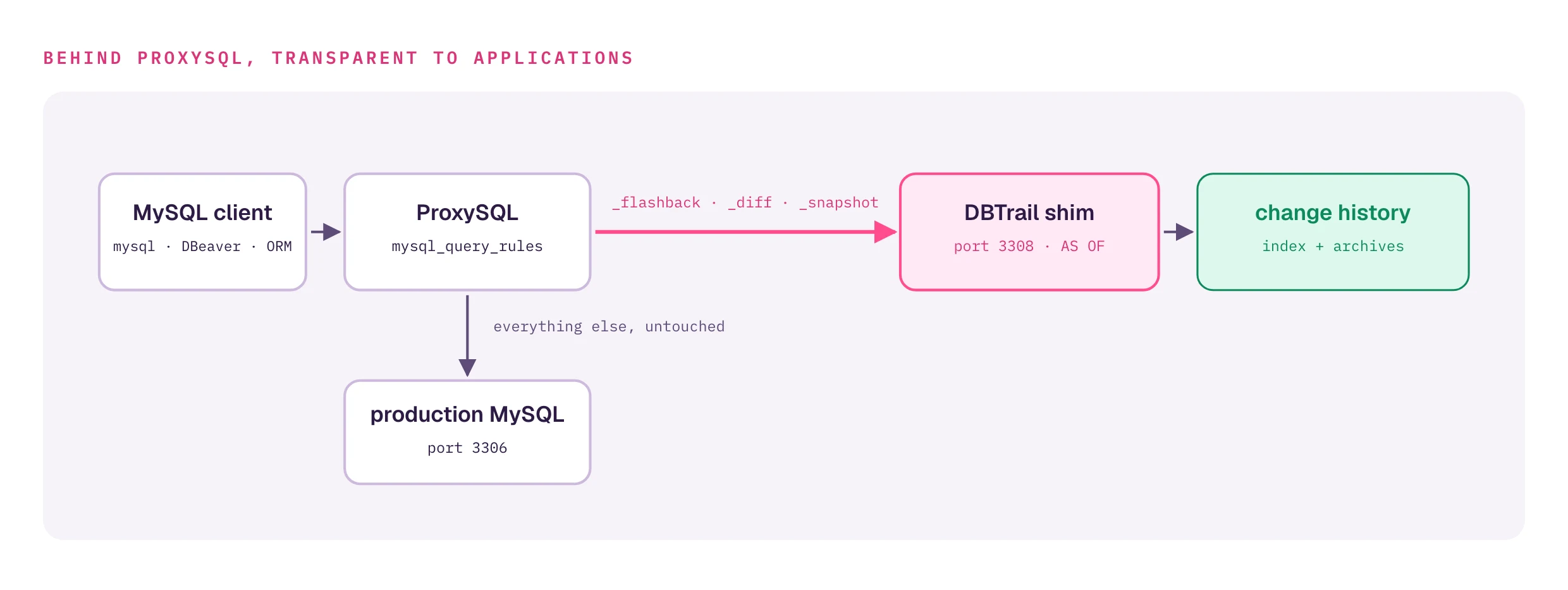
ProxySQL routes queries matching _flashback, _diff, or _snapshot to bintrail shim (which reads change events from the local bintrail index DB populated by bintrail stream) and forwards everything else to production MySQL.

ProxySQL's mysql_query_rules route any reference to a virtual schema (_flashback, _diff, _snapshot) to the shim's hostgroup. Every other query flows untouched to your production MySQL backend.

The shim parses the time-travel clause, extracts the primary key from your WHERE predicate, and reads change events from the local bintrail_index DB to reconstruct row state. Results come back over the wire as a normal MySQL result set, so the client never knows it talked to anything other than MySQL.

SQL dialect

FormBacked by
… FROM _flashback.t AS OF '<ts>' WHERE id = ? 1, 2row reconstruction at <ts>
… FROM _flashback.t FOR SYSTEM_TIME AS OF '<ts>' WHERE id = ? 1, 2same (ANSI alias)
… FROM _diff.t BETWEEN '<ts1>' AND '<ts2>' WHERE id = ? 1, 2every change in [ts1, ts2]
… FROM _snapshot.t AT GTID '<gtid>' WHERE id = ? 1, 2row state at that GTID

1 id here stands for the table's primary-key column — any single-column PK name works (customer_id, uuid, …); see the callout below.

2 Single equality (= <literal>) is the only predicate shape served end-to-end. IN (...) and BETWEEN <a> AND <b> are accepted by the safety check but the row resolver currently handles single equality only.

_flashback and _snapshot require an explicit AS OF clause — there is no implicit "current row state" form. The shim rejects a bare … FROM _flashback.t WHERE id = ? (no AS OF) with malformed time-travel query. For current rows, query the real table directly — those queries route to your production MySQL, not the shim.

AS OF NOW() - INTERVAL N MINUTE works — the shim evaluates the expression before reading the index.

_diff.<t> returns one row per change event with synthetic metadata columns (_event_id, _event_timestamp, _event_type, _gtid) followed by before_<col> / after_<col> pairs for every column in the table.

Two more shapes are recognized, both SELECT *-only and rewritten internally to _flashback: the hint-comment form SELECT /*+ DBTRAIL_AT='<ts>' */ * FROM t WHERE id = ?, and a bare trailing AS OF on the real table name (SELECT * FROM orders WHERE id = 42 AS OF '<ts>' — the AS OF clause must end the statement). bintrail proxysql-config installs routing rules for both.

Omitting the WHERE entirely runs a full-table reconstruction at the AS OF instant, buffered and capped at 100,000 rows. Against _flashback this returns only rows with binlog activity in the retained window; _snapshot becomes baseline-aware when the shim runs with --baseline-dir or --baseline-s3 (snapshots produced by bintrail baseline) and then returns the table's complete row state at that instant.

Point lookups require a primary-key predicate

A time-travel query with a WHERE clause must filter on the table's primary key — WHERE <pk> = <value>. The shim looks up the PK column from INFORMATION_SCHEMA.COLUMNS and matches the WHERE clause via AST, so customer_id, uuid, etc. all work — anything that's the table's actual primary key. A WHERE on a non-PK column is rejected with a parse error rather than silently returning the wrong row. Composite PKs are not yet supported. Omitting the WHERE entirely falls back to the (row-capped) full-table path described above.

Setup

You will install bintrail, initialize a local index, run a streamer that populates it from your MySQL binlog, generate a shim config file, add a hostgroup and a few mysql_query_rules to ProxySQL, and restart nothing. The shim listens on 127.0.0.1:3308 by default.

Three processes are involved, not one

The shim only reads from the local index DB. Two other things have to happen first or the index stays empty and every _flashback query returns nothing:

  1. bintrail init — creates the bintrail_index.binlog_events and related tables. One-time, idempotent.
  2. bintrail stream — tails the MySQL binlog and writes change events into the local index. Must run continuously.
  3. bintrail shim — the MySQL wire-protocol server ProxySQL routes virtual-schema queries to.

Skipping bintrail stream is the single most common reason a setup looks correct but every time-travel query returns empty.

1. Install the shim

The shim is bundled in the bintrail CLI as a subcommand — there is no separate binary to download. Install bintrail on the same host as ProxySQL (grab a build from the GitHub releases page, or see the quickstart) and confirm the subcommand is available:

bintrail shim --help

2. Initialize the local index

Pick a MySQL instance to hold the index (commonly the same MySQL that serves your application — see capacity planning for sizing) and run bintrail init once against it:

bintrail init --index-dsn 'bt_index:****@tcp(127.0.0.1:3306)/bintrail_index'

This creates the binlog_events, schema_snapshots, index_state, and supporting tables that both the streamer and the shim depend on. Without it, bintrail stream (and bintrail agent, if you run one) crashes on startup with:

schema migration: add binlog_events.connection_id column:
  Error 1146 (42S02): Table 'bintrail_index.binlog_events' doesn't exist

bintrail init is idempotent — safe to re-run after upgrades.

3. Start the binlog streamer

bintrail stream is the process that tails your MySQL binlog and writes change events into bintrail_index. It must be running before any _flashback query will return data.

bintrail stream \
  --source-dsn 'bintrail:****@tcp(127.0.0.1:3306)/' \
  --index-dsn  'bt_index:****@tcp(127.0.0.1:3306)/bintrail_index' \
  --server-id  201 \
  --start-file mysql-bin.000001 \
  --start-pos  4 \
  --schemas    shop

Notes:

  • --server-id is the MySQL replication server-id — a uint32. It must be different from any other replica (including a bintrail agent running on the same host — both processes connect to MySQL as replicas, and a duplicate ID will get one of them disconnected).
  • --schemas filters the binlog to the schemas you actually care about and keeps the streamer from trying to index bintrail_index itself. Without it you will see a FK cascade constraint found warning at startup (see Troubleshooting).
  • --start-file / --start-pos point at the first binlog position to read. For a brand-new setup, mysql-bin.000001 / 4 is the beginning of the first binlog file; for a running database use the values from SHOW MASTER STATUS at the moment you start.

Run it under systemd or your supervisor of choice — it stays in the foreground and must restart on crash.

4. Generate shim.yaml

bintrail init-shim scaffolds the file from your existing .bintrail.env (the file holding BINTRAIL_SOURCE_DSN, BINTRAIL_INDEX_DSN, and BINTRAIL_SERVER_IDbintrail config init creates one):

cd /etc/bintrail   # or wherever your .bintrail.env lives
bintrail init-shim --out shim.yaml

The generated file has one tenant block populated from .bintrail.env, plus two TODO lines for the application credentials — uncomment them and fill in the MySQL user your clients connect through ProxySQL with. The result looks like:

listen: '127.0.0.1:3308'

tenants:
  - server_id: '201'                                   # from BINTRAIL_SERVER_ID
    source_dsn: 'app_ro:****@tcp(127.0.0.1:3306)/acme_prod'  # from BINTRAIL_SOURCE_DSN
    mysql_user: acme_app
    mysql_password: "cleartext-password"               # MUST be cleartext — see below

The shim reads only these fields per tenant: mysql_user, mysql_password, source_dsn, and server_id. One tenants[] entry per MySQL user that should be allowed to issue time-travel queries.

What `tenants[].server_id` is

bintrail init-shim fills it from BINTRAIL_SERVER_ID in .bintrail.env — the same server ID your streamer runs with. The shim itself tolerates it being empty; only the streamer requires a server ID. Don't confuse filling this field with picking a replication server-id: bintrail stream --server-id (step 3) must be a uint32 that's unique among all replicas of your source MySQL.

source_dsn must include the schema in its `/<db>` path

The shim derives the default schema (what _flashback resolves against) from the /<db> suffix on source_dsn. In the example above, that's /acme_prod. If you omit it (e.g. tcp(127.0.0.1:3306)/), _flashback.<table> queries can't resolve to a real schema and will fail.

Legacy fields — two different failure modes

Older versions of this guide listed agent_url, agent_token, index_dsn, and logical_schema under tenants[]. They behave differently today, and the difference matters because one set keeps the shim running while the other prevents it from starting:

  • agent_url / agent_token — struct-tagged upstream, so yaml.UnmarshalStrict parses them cleanly and the shim ignores the values at runtime. Safe to leave in but adds noise; remove them for hygiene.
  • index_dsn / logical_schemano struct tag in the shim's LoadTenantConfigs. UnmarshalStrict will REJECT either as an unknown field and the shim will fail to start. Delete them before launching. index_dsn is now a CLI flag (--index-dsn); the schema comes from source_dsn's /<db> path (see the callout above).

mysql_password must be cleartext

ProxySQL's mysql_users.password accepts either cleartext or a *HEX… hash. The shim does nottenants[].mysql_password in shim.yaml must be the cleartext password. If your ops process pre-hashes passwords for ProxySQL, you still need to store the cleartext in shim.yaml. Either lock down the file (chmod 0600, root-owned) or use a secret-management story your team is comfortable with. (bintrail proxysql-config recomputes the SHA1 hash ProxySQL needs from mysql_password automatically.)

What source_dsn is for

source_dsn is read-only and is used to look up column metadata for virtual tables from INFORMATION_SCHEMA.COLUMNS. A scoped read-only user against the live source schema is the safest choice. If you omit it, the shim falls back to reading column metadata from the index DB's schema_snapshots, which still works but loses fidelity for dropped tables.

5. Start the shim

bintrail shim \
  --shim-config /etc/bintrail/shim.yaml \
  --index-dsn   'bt_index:****@tcp(127.0.0.1:3306)/bintrail_index'
# → logs a "shim listening" line on 127.0.0.1:3308 and stays in foreground

--index-dsn is required and must match what you passed to bintrail init and bintrail stream; if BINTRAIL_INDEX_DSN is set in the environment (e.g. loaded from .bintrail.env), the flag can be omitted. --shim-config defaults to ./shim.yaml — and the flag is --shim-config, not --config (the CLI rejects --config with unknown flag: --config). Run it under systemd like the streamer.

6. Configure ProxySQL

bintrail proxysql-config generates the ProxySQL setup SQL from BINTRAIL_SOURCE_DSN (in .bintrail.env) and the shim.yaml you wrote in step 4:

bintrail proxysql-config --out proxysql-setup.sql
mysql -u admin -p -h 127.0.0.1 -P 6032 < proxysql-setup.sql

The generated script registers your source MySQL and the shim as backends (hostgroups 990 and 991), adds the routing rules (rule IDs 990001–990006), wraps its DML in BEGIN/COMMIT, and finishes with LOAD … TO RUNTIME / SAVE … TO DISK. Re-running it is safe — its DELETEs are scoped to the dbtrail-owned hostgroups and rule IDs, so it never touches operator-managed config.

Prefer to wire it by hand, or already have hostgroups configured? The equivalent manual SQL, against the ProxySQL admin interface (default port 6032) — if you already have a production hostgroup, skip the first INSERT and reuse your existing hostgroup ID in default_hostgroup below:

-- Register your production MySQL backend (skip if you already have one).
-- Replace `mysql-prod` and the port with your real values.
INSERT INTO mysql_servers (hostgroup_id, hostname, port)
VALUES (10, 'mysql-prod', 3306);

-- Register the shim as a separate backend in hostgroup 99.
INSERT INTO mysql_servers (hostgroup_id, hostname, port)
VALUES (99, '127.0.0.1', 3308);

-- Register every user that should be allowed time-travel queries.
-- The username here MUST match a `mysql_user` entry in shim.yaml.
-- ProxySQL accepts either cleartext or a *HEX… hash for password here;
-- shim.yaml needs the cleartext regardless (see "mysql_password must be cleartext").
-- On MySQL 8.0+ / Percona 8.4 backends, this password needs special handling —
-- see step 7 below for the two options.
INSERT INTO mysql_users (username, password, default_hostgroup, active)
VALUES ('acme_app', 'plaintext-or-hashed', 10, 1);

-- Route virtual-schema queries to the shim. Earlier rule_id wins.
INSERT INTO mysql_query_rules
  (rule_id, active, match_pattern, destination_hostgroup, apply)
VALUES
  (10, 1, '(?is)\b(?:from|join|update|into)\s+`?_flashback`?\.', 99, 1),
  (11, 1, '(?is)\b(?:from|join)\s+`?_diff`?\.',                 99, 1),
  (12, 1, '(?is)\b(?:from|join)\s+`?_snapshot`?\.',             99, 1);

LOAD MYSQL SERVERS TO RUNTIME;
SAVE MYSQL SERVERS TO DISK;
LOAD MYSQL USERS TO RUNTIME;
SAVE MYSQL USERS TO DISK;
LOAD MYSQL QUERY RULES TO RUNTIME;
SAVE MYSQL QUERY RULES TO DISK;

mysql-multiplexing must stay on

ProxySQL's default. With multiplexing off, ProxySQL pins one backend connection per client and the shim only ever sees the first user that connected — every subsequent query gets resolved against the wrong tenant. If you've disabled multiplexing for unrelated reasons, the shim is not safe to run.

7. Auth plugin compatibility (MySQL 8.0+ / Percona 8.4)

The ProxySQL setup above hides a subtle handshake. ProxySQL authenticates your client against mysql_users, then opens a backend connection to your MySQL server as the same user. That backend handshake uses whatever auth plugin MySQL is configured for the user — and MySQL 8.0 and newer default to caching_sha2_password, which ProxySQL can only complete if it has the cleartext password for the backend user.

Follow the inline SQL above (or the SQL that bintrail proxysql-config generates) verbatim on a MySQL 8.x backend and you'll hit a silent failure on the first connect:

$ mysql -h 127.0.0.1 -P 6033 -u bintrail -p<PW> mydb
ERROR 1045 (28000): Access denied for user 'bintrail'@'localhost' (using password: YES)

ProxySQL is using a SHA1 hash (the mysql_native_password format) where it needs the cleartext for the backend handshake. See dbtrail/dbtrail#310. Which path you take depends on the MySQL version you're connecting to:

MySQL versionDefault auth pluginWhat to do
MySQL 5.7 / Percona 5.7mysql_native_passwordNothing — works as-is.
MySQL 8.0 / Percona 8.0caching_sha2_passwordOption A (switch to mysql_native_password) or Option B (cleartext override).
MySQL 8.4 / Percona 8.4 LTScaching_sha2_passwordOption B onlymysql_native_password was removed in 8.4.

Option A: switch the bintrail user to mysql_native_password (MySQL 8.0 only)

mysql_native_password is deprecated in 8.0 but still supported. Some 8.0 installs ship without the plugin loaded — INSTALL it first, then ALTER. Run this against MySQL directly (not through ProxySQL), as a privileged user:

INSTALL PLUGIN mysql_native_password SONAME 'auth_native_password.so';
-- ERROR 1125 (plugin already installed) is fine — ignore it.

ALTER USER 'bintrail'@'%'         IDENTIFIED WITH mysql_native_password BY '<password>';
ALTER USER 'bintrail'@'localhost' IDENTIFIED WITH mysql_native_password BY '<password>';
FLUSH PRIVILEGES;

After this, the SHA1 hash that bintrail proxysql-config (or the inline SQL above) stored in mysql_users works end-to-end — no further ProxySQL changes needed.

Option B: keep caching_sha2, store the cleartext password in ProxySQL

Run this against the ProxySQL admin interface (port 6032), after the inline SQL or bintrail proxysql-config output has been loaded:

DELETE FROM mysql_users WHERE username = 'bintrail';

-- default_hostgroup must match what you used when you first registered the user:
--   * 10 if you followed the inline SQL in step 6 above
--   * whatever `bintrail proxysql-config` generated (commonly 990) if you used that path
INSERT INTO mysql_users (username, password, default_hostgroup, active, use_ssl)
VALUES ('bintrail', '<cleartext-password>', 10, 1, 0);

LOAD MYSQL USERS TO RUNTIME;
SAVE MYSQL USERS TO DISK;

ProxySQL now holds the cleartext password and can complete the caching_sha2 backend handshake. The exposure is the same as the cleartext tenants[].mysql_password in shim.yaml — lock down the ProxySQL admin interface (and whichever bootstrap store seeded it) the same way you'd lock down the shim config.

Don't forget the shim itself

Once ProxySQL is talking to MySQL over caching_sha2, ProxySQL also reuses caching_sha2 when it opens its backend connection to the shim for any _flashback / _diff / _snapshot query. The shim's listener defaults to advertising mysql_native_password, so the handshake fails again — this time with 1045 Access denied from the shim, not from MySQL.

Add --auth-method=caching_sha2_password to the bintrail shim command from step 5 so the shim's listener advertises the matching plugin:

bintrail shim \
  --shim-config /etc/bintrail/shim.yaml \
  --index-dsn   'bt_index:****@tcp(127.0.0.1:3306)/bintrail_index' \
  --auth-method caching_sha2_password

This path requires ProxySQL 2.7+ between the application and the shim — the 2.6 LTS line isn't verified to negotiate SHA2 against backends. See dbtrail/dbtrail#286. If you took Option A and left the user on mysql_native_password, leave this flag off — the default listener auth method is correct for that path.

8. Test

Connect through ProxySQL with one of the users you registered:

mysql -h <proxysql-host> -u acme_app -p
SELECT * FROM _flashback.orders AS OF '2026-04-27 09:00' WHERE id = 42;

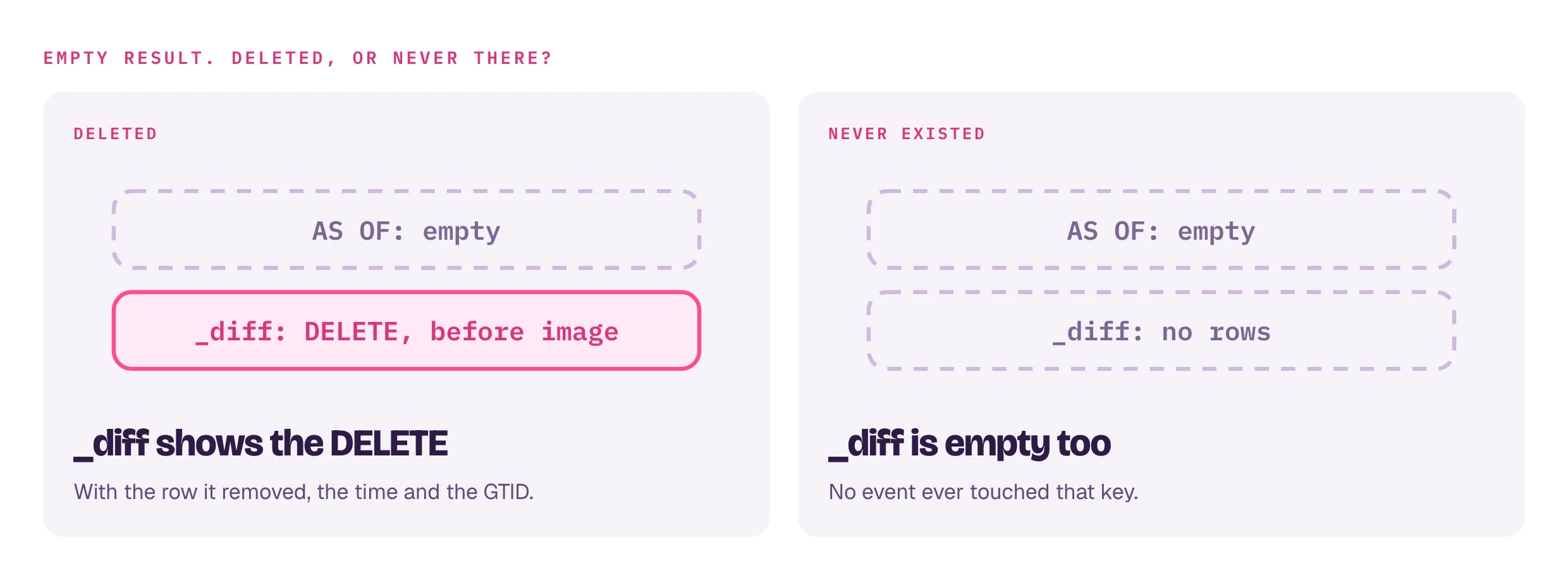
If the row existed at that timestamp, you get its full state back. If it was deleted at or before <ts>, the resultset is empty — the row did not exist at that instant. See the DELETE-event handling note below for how to tell "deleted" apart from "never existed".

If you also need the time of the deletion or the deleter's identity, use SELECT * FROM _diff.orders BETWEEN '<earlier>' AND '<later>' WHERE id = 42 and look for an event with _event_type = 'delete'_diff carries the full event metadata.

Authentication

There are two authentication hops, and they use different mechanisms — by design.

ProxySQL → shim. ProxySQL authenticates your client against mysql_users, then opens a backend connection to the shim hostgroup as the same username. The shim then re-authenticates against shim.yaml's tenants[].mysql_password (which must be cleartext — see the callout above) and binds the matching tenant to the session.

Shim → MySQL (read-only). The shim's only outbound connection is to the local MySQL index, plus an optional source_dsn read-only connection for INFORMATION_SCHEMA.COLUMNS lookups. There is no outbound HTTP call.

The implication for operators: every user authorized to issue time-travel queries must appear in both mysql_users (ProxySQL) and tenants[] (shim). A user listed in ProxySQL but missing from shim.yaml is rejected at the shim's handshake with 1045 Access denied rather than crashing the connection.

Errors you might see

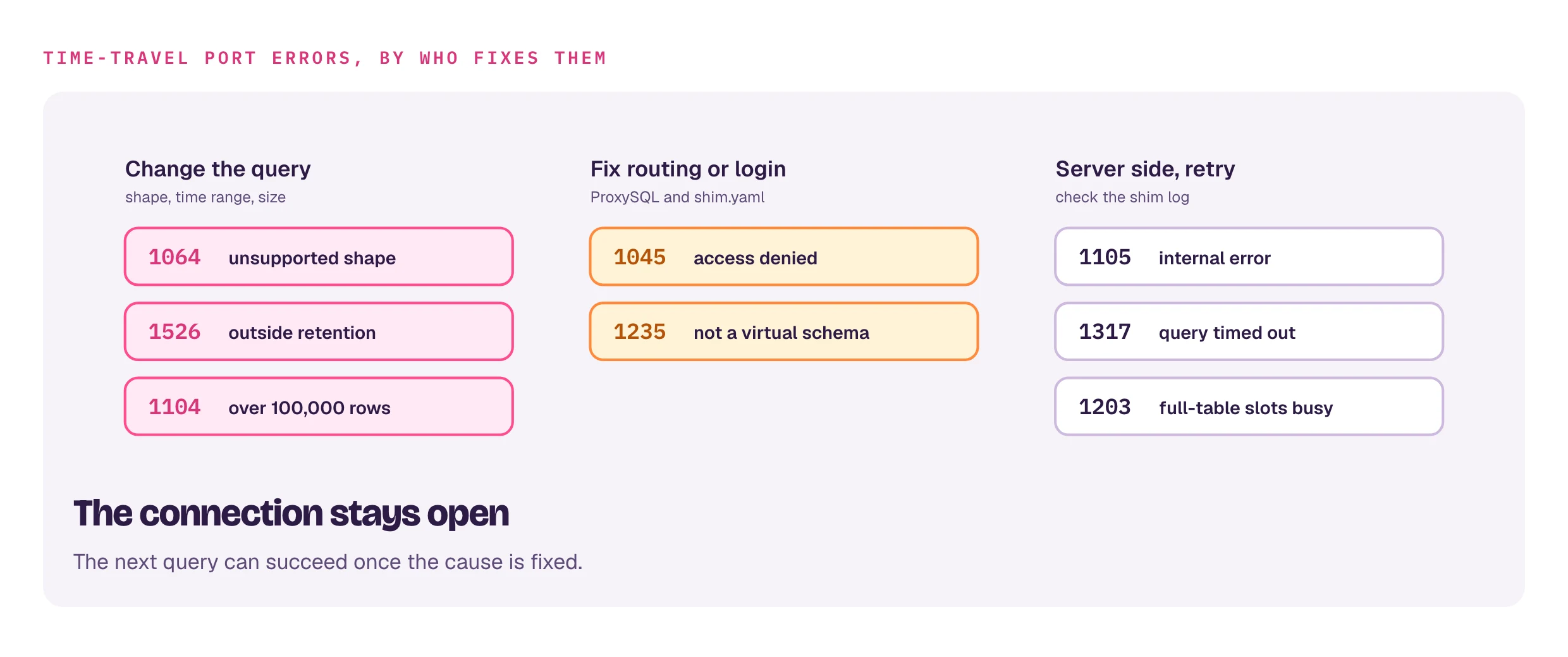
The shim emits typed MySQL error codes so ORMs and monitoring can distinguish user-input errors from server faults:

What happenedMySQL error
Query mentions a virtual schema but doesn't match a supported shape (missing AS OF or BETWEEN, non-PK WHERE, unparseable timestamp)1064 ER_PARSE_ERROR
Non-virtual-schema query reached the shim (direct :3308 connection bypassing ProxySQL; routing misconfigured)1235 ER_NOT_SUPPORTED_YET
The AS OF / BETWEEN range falls outside what the index (plus archives) retains1526 ER_NO_PARTITION_FOR_GIVEN_VALUE
Full-table reconstruction exceeded the 100,000-row cap1104 ER_TOO_BIG_SELECT
Credential mismatch1045 ER_ACCESS_DENIED_ERROR
Anything else — index DB unreachable, archive fetch failure, internal error1105 ER_UNKNOWN_ERROR

The connection stays open after any of these — your next query on the same connection can succeed if the issue was transient.

The shim itself does not impose a per-query timeout. ProxySQL is the source of truth via mysql-default_query_timeout and mysql-connect_timeout_server, so timeout policy lives in one place.

Troubleshooting

  • Table 'bintrail_index.binlog_events' doesn't exist on bintrail stream (or bintrail agent) startup. You skipped step 2 — run bintrail init --index-dsn '<dsn>' against the index DSN.
  • unknown flag: --config from bintrail shim. The flag is --shim-config, not --config.
  • --index-dsn is required from bintrail shim. The shim does not read the index DSN from yaml — pass --index-dsn on the CLI or set BINTRAIL_INDEX_DSN in the environment.
  • _flashback queries always return empty. bintrail stream is not running, or it has a different --index-dsn than the one you gave the shim. Check SELECT COUNT(*) FROM bintrail_index.binlog_events directly — if it's 0, the streamer never wrote anything.
  • FK cascade constraint found ... schema=bintrail_index warning at bintrail stream startup. Benign — these are the index DB's own internal FKs (on access_rules), not your schema's. With a --schemas <your_schema> filter that excludes bintrail_index, the warning goes away.
  • Duplicate server-id in MySQL replica list. bintrail stream and bintrail agent both connect to MySQL as replicas — give each a unique --server-id, and make sure neither conflicts with other replicas you operate.

Limitations during beta

  • DELETE events return an empty resultset, not a tombstone. If the latest event at or before the target time is a DELETE, the row did not exist at that instant and _flashback / _snapshot return zero rows (Oracle AS OF semantics) — there is no _state = 'deleted' marker. To distinguish "deleted" from "never existed", query _diff.<t> BETWEEN <a> AND <b> WHERE id = <id>: a deleted row produces at least one event (including the DELETE with its before_ image); a row that never existed produces none.
  • Composite primary keys are not yet supported. Tables whose PK spans more than one column reject up front with "composite primary keys are not yet supported". Workaround: use _diff.<t> and filter client-side, or split the query.
  • Dropped tables degraded for time-travel. Once a table is fully dropped from the source, the shim falls back to the bintrail index DB's schema_snapshots for column metadata. That fallback doesn't carry primary-key information, so time-travel queries against dropped tables reject with "table has no primary key". _diff queries that don't require PK lookup are unaffected.
  • Single equality predicate today: WHERE id = <literal>. IN (...) and BETWEEN are recognized by the safety check but the row resolver only handles single equality. (Omitting the WHERE entirely is the separate full-table path described under SQL dialect.)
  • Full-table reconstruction is buffered, not streamed — capped at 100,000 rows per query, surfaced as ER_TOO_BIG_SELECT (1104). Narrow the AS OF range or add a PK filter. Point lookups are unaffected.
  • No prepared statements — the parser only handles literal queries. Most ORMs that emit ? placeholders will be rejected.
  • No mixed JOINs between a virtual schema and a real table (_flashback.orders f JOIN customers c …). The shim rejects these explicitly. Federated planning is on the roadmap.
  • No INSERT/UPDATE/DELETE against virtual tables — recover is always read-only. This matches dbtrail's overall guarantee that the system never executes writes against your database.
  • No multi-statement queries — one statement per round-trip.
  • _diff has no implicit row cap — a hot row can return thousands of events in one response. Narrow the BETWEEN window if that's too much for one query.
  • Schema drift — if a column was added after the target timestamp, the reconstructed row will have NULL for that column.

If you hit a limitation that's blocking your use case, open an issue or email support — beta is the right time for us to hear about it.

Why a shim and not a ProxySQL plugin

ProxySQL has a Lua-like rewrite engine but no way to call out to a remote service mid-query. Routing to a backend that speaks MySQL is the well-trodden path — the same shape Vitess, PlanetScale, and other MySQL-protocol gateways use. The shim is a small Go binary and adds one extra hop on the time-travel path only; production traffic flows directly to your real MySQL through ProxySQL's normal routing.

On this page