
Backup settings
What shapes a backup for each server, where each value comes from, and which ones need a restart.
Web interface → Snapshots → Settings, under Where and how often. The snapshots themselves and downloads live on the Versions tab of the same page: Snapshot strategy.
The Settings tab has three parts, and each one is changed in a different place:
| Part | Where you change it | Takes effect |
|---|---|---|
| Per server | Where it lives, then Save on that server | Immediately |
| Update the copy (the schedule) | Pick how often, five minutes to a day (At (UTC) only for a day), then Turn on | Next slot |
| Delete by age | On the Settings tab, or in how DBTrail is started | Immediately |
Everything else is set at startup: a flag or a variable, read when DBTrail starts.
A table that did not change since the last snapshot keeps the file it already has instead of being written again. That is always on, and the snapshot is complete either way. With a Local folder the file is linked; with snapshots only in a bucket (since 0.101.0) it is copied inside S3, without being downloaded.
Per server
Local folder and S3 location. Save or Enter. The old Don't
automatically include archived data in queries box is no longer on the page:
a value saved before keeps working, and the setting is now command-line only
(--no-archive).
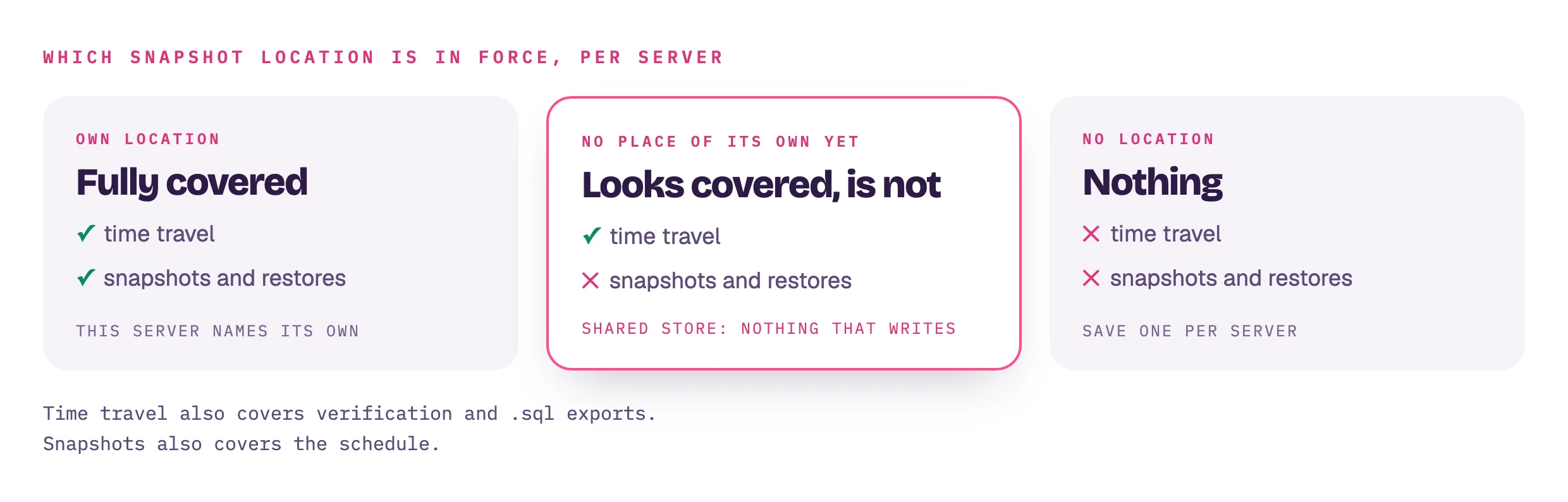
No place of its own yet on that row means this server has no location of its own, so it falls back to the one DBTrail itself was started with. That one is shared by every server: a backup built there would fold this server's changes onto another server's snapshots and belong to neither. So reading the past works and making a backup refuses. Save a location on the server itself.
Warnings under a server:
- "The schedule cannot run as things stand." Usually a location cleared after the schedule was made. Every slot refuses until you save one.
- "With S3 only, each scheduled update downloads, rewrites and uploads again the tables that changed." A grey note, not a problem: an S3 location without a Local folder is updated through the staging folder (since 0.101.0), and unchanged tables are copied inside S3. A Local folder saves downloading the changed tables first.
- "…a scheduled update is built in the staging folder, which cannot be used
here…" In red: the staging folder (
BINTRAIL_CONSOLE_BASELINE_STAGING) cannot be written, so every run reads your whole database. Fix the folder or add a Local folder.
With an S3 location, the server also shows about how many backups reach the bucket every 30 days, and Bucket rule to expire old snapshots: a days field, an S3 lifecycle rule for that server's backup prefix, and the command to apply it. DBTrail never deletes from S3 and never applies the rule; you do. The rule expires by age only, and the apply command replaces every rule on the bucket.
Set at startup
Not shown on the page. These are the values DBTrail was given when it started, and a running process cannot change how it was started: to change one, change the flag or variable and restart DBTrail. The one exception is Delete by age on the Settings tab: a value saved there is kept in DBTrail's own settings file and wins over the flag and the variable.
| Row | Flag or variable |
|---|---|
| Default local folder | --baseline-dir |
| Default S3 location | --baseline-s3 |
| Delete local snapshots older than | --baseline-retain |
| Refresh snapshots every | --baseline-refresh-interval |
| Lock while dumping | BINTRAIL_CONSOLE_BASELINE_LOCK_MODE (BASELINE_LOCK_MODE in the Compose .env). Leave it unset: DBTrail picks lock-all for RDS and Aurora and ftwrl elsewhere. Set it only to force one (how a snapshot stays point-in-time) |
| Read database now button | BINTRAIL_CONSOLE_BASELINE_TRIGGER (BASELINE_TRIGGER=0 in the Compose .env) |
| .sql build folder | BINTRAIL_CONSOLE_BASELINE_STAGING |
| Verify every | --verify-interval |
| Verify only these tables | --verify-tables |
Not on this screen: whether a scheduled update rewrites a changed table or
writes its changes beside it (on by default since v0.84.0). It is set at
startup only, with the flag --baseline-table-deltas=false or the variable
BINTRAIL_BASELINE_TABLE_DELTAS=false to turn it off:
how the Parquet copy works.
Good to know
- Snapshots says how each scheduled backup was made and, when it was a full copy, why. The reason is saved with the run, so it stays true after the cause is gone.
- Why a run read the whole database: the four cases are in how the Parquet copy works.
- After a long stop, a scheduled update can become a full backup (since
v0.84.0). Before each slot the daemon measures how many changes an update
would have to apply since the previous backup, against a cost model fitted
on its last five measured updates and the duration of the last full backup.
When the update is estimated to cost more, a full backup is taken and the
run's reason on Snapshots reads
Full read instead of an update: an update from the recorded changes would take longer than a full read: <N> events since the previous snapshot would take about <time> to apply at the measured rate, and the last full read took <time>. When one of the three is unknown (no full backup on record, no measured update rate, or an index that did not answer the probe in time, warned once in the log), the age of the previous backup decides alone: older than two hours or six schedule intervals, whichever is longer, and the reason startsthe previous snapshot is too old to update fromand names what was missing. Both are said in the daemon log before the run starts. Snapshots also says which method the next slot will use, from the same measurement:Next run will take a full read from your database (...). A server whose full backups cannot start keeps updating, however long it takes. - A scheduled update with nothing new does not start (since v0.83.0).
Each cycle first asks whether anything was indexed since the last update
and whether the previous backup is still inside the window the index can
update from. When nothing is new, the cycle is skipped: no run appears on
Snapshots for it, and the daemon log says
baseline refresh: nothing has been indexed since the last fold; skipping this cycle. A quiet server no longer republishes the same rows every interval. - A full backup with a Local folder is published as soon as it is on disk;
the copy to S3 runs afterwards (since v0.84.0). The upload no longer holds
the server's backup slot, so a scheduled update can run alongside it and
reads the local copy, and the upload sends only the new snapshot, then any
earlier local snapshot the bucket lacks. While the copy runs, Snapshots
shows
Snapshot saved on this machine: <N> table(s). Still copying it to the snapshot destination…, and the schedule counts the run as in flight until it finishes. An upload that fails after that is a failed run that keeps the local snapshot and names where it is. With an S3 location alone, nothing is published until the bucket has it, as before. - A backup built from recorded changes checks free disk before each file it writes and refuses when the file plus 1 GiB does not fit.
- A read-only web interface (
serve) shows the per-server list only: no schedule and no Delete by age card. - A registry written by a newer DBTrail: values shown, saving refused, so nothing the newer version stored is dropped.