Local Agents
Run the bintrail agent on your own infrastructure while dbtrail handles change indexing, querying, and AI integration
With Local Agents, you run the bintrail agent on your own servers — right next to your MySQL instances — while dbtrail handles change indexing, querying, recovery, and Claude/MCP integration in the cloud. Your data never leaves your network until the agent sends change metadata to dbtrail for indexing.
When to use Local Agents
Local Agents are a good fit when:
- Data residency — compliance or policy requires that the binlog agent runs inside your own network
- Network restrictions — your MySQL server is not reachable from the public internet, and you cannot open inbound ports
- Existing infrastructure — you already have servers with access to MySQL and want to reuse them
- Latency — the agent runs on the same network (or host) as MySQL, minimizing replication lag
Pro plan or higher
Local Agents are available on Pro, Premium, and Enterprise plans. The Free plan uses dbtrail-managed agents. You can upgrade at any time from Dashboard → Settings → Billing.
How it works
In managed mode (the default), dbtrail provisions an EC2 instance and runs the agent for you. With Local Agents, you install and run the agent yourself. The agent connects outbound to dbtrail — no inbound ports need to be open on your side.
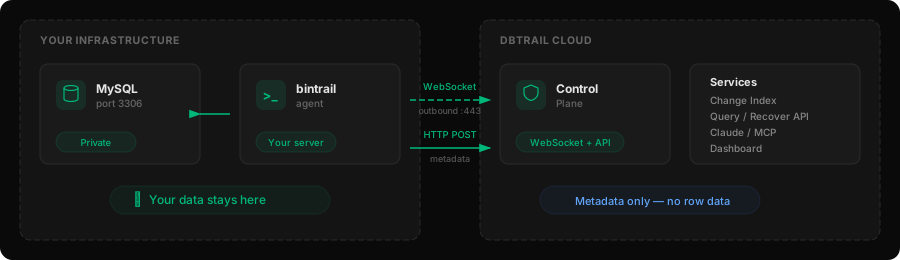
- WebSocket — the agent maintains a persistent outbound connection to dbtrail's control plane, which sends commands (init, snapshot, query, recover) over this channel
- HTTP POST — the agent sends change metadata to dbtrail's ingestion endpoint, where it is indexed for querying and recovery
You only need one binary: bintrail. The agent is the subcommand bintrail agent.
Local Agents vs Managed
| Managed (default) | Local Agents | |
|---|---|---|
| Agent runs on | dbtrail-managed EC2 | Your infrastructure |
| MySQL credentials | Stored in dbtrail's encrypted vault | You manage them locally |
| S3 for archives | dbtrail-managed bucket | Your own S3 bucket (recommended) |
| Stream management | Via dbtrail dashboard and API | You manage via systemd |
| Onboarding | Fully automated | Steps below |
| Connection direction | dbtrail → agent (private VPC) | Agent → dbtrail (outbound WebSocket) |
| Inbound ports required | None (agent is in dbtrail's VPC) | None (agent connects outbound) |
| Available on | All plans | Pro, Premium, and Enterprise |
Setup
30-minute connection window
After registering a server (step 3), the agent must connect within 30 minutes or the server transitions to an error state. We recommend completing steps 1–4 first, then registering the server and installing the agent promptly.
1. Create your organization
Sign up at dbtrail.com and select Local Agent as the deployment mode during signup. If you already have an organization on a managed plan, upgrade to Pro or Premium from Dashboard → Settings → Billing and contact support to switch deployment modes.
2. Create a MySQL replication user
The agent connects to your MySQL as a replica. Create a dedicated user with the required privileges:
CREATE USER 'bintrail'@'%' IDENTIFIED BY 'STRONG_PASSWORD_HERE';
GRANT REPLICATION SLAVE, REPLICATION CLIENT ON *.* TO 'bintrail'@'%';
GRANT SELECT ON *.* TO 'bintrail'@'%';| Privilege | Why |
|---|---|
REPLICATION SLAVE | Stream binlog events via the replication protocol |
REPLICATION CLIENT | Query replication status (GTID position, binlog list) |
SELECT | Read table schemas and resolve column names from before/after images |
Use a strong password
Store this password securely — you will add it to the agent configuration file in step 6. Do not reuse an existing application user.
Your MySQL server must also have binary logging enabled with row-based format:
# my.cnf or my.ini
binlog_format       = ROW
binlog_row_image    = FULL
gtid_mode           = ON
enforce_gtid_consistency = ON
3. Register a server
Register the MySQL server you want to monitor. With Local Agents, you do not provide MySQL credentials to dbtrail — you manage those locally on your agent.
- Go to Dashboard → Servers → Register Server
- Fill in the server details:
| Field | Value | Notes |
|---|---|---|
| Name | production-main | Human-readable label for this server |
| Host | db.internal.example.com | Your MySQL hostname (for your reference only) |
| Port | 3306 | MySQL port |
- Click Register
The server will appear with status Provisioning. dbtrail sets up the metadata index in the background — this takes about a minute. Note the Server ID shown on the server detail page (e.g., srv-1a2b3c) — you will need it for stream management later.
curl -X POST https://api.dbtrail.com/api/v1/servers \
  -H "Authorization: Bearer bt_live_YOUR_API_KEY" \
  -H "Content-Type: application/json" \
  -d '{
    "name": "production-main",
    "host": "db.internal.example.com",
    "port": 3306
  }'
No mysql_user or mysql_password fields are needed — credentials stay on your server. The response includes the server_id you will need for stream management.
4. Generate an API key
The agent uses an API key to authenticate with dbtrail. If you already have one, skip this step.
- Go to Dashboard → Settings → API Keys
- Click Create API Key
- Copy the key — it starts with
bt_live_and is shown only once
Save your API key
The API key is displayed only at creation time. Store it securely — you will need it in the next step for the agent configuration.
5. Install the agent
The bintrail agent runs as a systemd service on any Linux server — it does not need to be on the same host as MySQL. The agent connects to MySQL via TCP replication (like a replica), so it works with RDS, Aurora, or any remote MySQL instance.
System requirements
- Linux (x86_64 or ARM64/Graviton) with glibc 2.35+ and systemd
- Outbound TCP 3306 to your MySQL server (source) and MySQL index
- Outbound HTTPS (443) to
api.dbtrail.com(WebSocket + metadata API) - Outbound HTTPS (443) to your S3 bucket endpoint (if using S3 archives)
Supported platforms
The bintrail binary requires glibc 2.35 or newer:
| Distro | Minimum version | glibc |
|---|---|---|
| Ubuntu | 22.04+ | 2.35+ |
| Debian | 12 (Bookworm)+ | 2.36+ |
| RHEL / Rocky / Alma | 9.3+ | 2.35+ |
| Fedora | 36+ | 2.35+ |
Not supported: Amazon Linux 2 (glibc 2.26), Amazon Linux 2023 (glibc 2.34, not upgradeable), RHEL 7/8 (glibc 2.17/2.28), Ubuntu 20.04 (glibc 2.31).
Amazon Linux 2023
AL2023 ships glibc 2.34 and Amazon does not provide a newer version — it cannot be upgraded. Use Ubuntu 24.04 as your AMI instead, or build bintrail from source on AL2023.
You can check your glibc version with:
ldd --version | head -1NAT Gateway
If your server is in a private subnet without a public IP, it needs a NAT Gateway (or equivalent) for outbound internet access to api.dbtrail.com. For S3, you can use a VPC Gateway Endpoint instead (free).
See Capacity Planning for detailed CPU, memory, and disk sizing. As a starting point: 1 vCPU, 4 GB RAM, 50 GB disk handles most workloads.
Download bintrail
The release tarball includes the bintrail CLI — the agent is a subcommand (bintrail agent), not a separate binary. Check the releases page for newer versions:
curl -fSL "https://github.com/dbtrail/bintrail/releases/download/v0.4.1/bintrail_0.4.1_linux_arm64.tar.gz" \
  | sudo tar -xz -C /usr/local/bin/ bintrail
curl -fSL "https://github.com/dbtrail/bintrail/releases/download/v0.4.1/bintrail_0.4.1_linux_amd64.tar.gz" \
| sudo tar -xz -C /usr/local/bin/ bintrailVerify the install:
bintrail --version6. Configure the agent
Create the service user, index database, and configuration. Replace the placeholders with your actual values.
Create the service user
sudo groupadd --system bintrail 2>/dev/null || true
sudo useradd --system --no-create-home --shell /usr/sbin/nologin -g bintrail bintrail 2>/dev/null || true
id bintrail  # verify: should show uid/gid for bintrail
Create the environment file
sudo mkdir -p /etc/bintrail
sudo tee /etc/bintrail/agent.env > /dev/null <<'EOF'
# dbtrail API key (from Dashboard → Settings → API Keys)
BINTRAIL_API_KEY=bt_live_YOUR_API_KEY

# dbtrail control plane endpoint
BINTRAIL_ENDPOINT=wss://api.dbtrail.com/v1/agent

# MySQL source (the database you're monitoring)
BINTRAIL_SOURCE_DSN=bintrail:YOUR_PASSWORD@tcp(YOUR_MYSQL_HOST:3306)/

# MySQL replication server ID (unique uint32, must differ from source's server-id)
BINTRAIL_SERVER_ID=99996

# Schemas to monitor (comma-separated, optional — defaults to all user schemas)
# BINTRAIL_SCHEMAS=myapp,analytics

# S3 bucket for Parquet archives (recommended — without S3, row data
# lives only in memory and is lost on restart)
# BINTRAIL_S3_BUCKET=my-company-dbtrail
# BINTRAIL_S3_REGION=us-west-2
EOF

sudo chown root:bintrail /etc/bintrail/agent.env
sudo chmod 640 /etc/bintrail/agent.env
Protect the environment file
The environment file contains your API key and MySQL credentials. It is owned by root:bintrail with mode 640 so only root and the bintrail service user can read it.
Server ID
--server-id is the MySQL replication server ID (a unique uint32), not an ID from the dbtrail dashboard. It must be different from your source MySQL's server-id. Pick any unused number (e.g., 99996). Check existing IDs with SELECT @@server_id; on your source.
S3 archive storage (recommended)
The rotate daemon periodically exports old index events to Parquet files in S3, achieving roughly 60:1 compression vs raw binlog. This keeps local disk usage bounded and provides durable long-term storage. Even with 365 days of retention on a moderately active server, S3 costs are typically under $1/month.
Without S3, events stay in the local index until you manually purge them. Disk will grow over time.
To use S3, create a bucket and grant the agent access via an IAM instance role or access keys:
{
  "Version": "2012-10-17",
  "Statement": [
    {
      "Effect": "Allow",
      "Action": [
        "s3:PutObject",
        "s3:GetObject",
        "s3:DeleteObject"
      ],
      "Resource": "arn:aws:s3:::my-company-dbtrail/bintrail/*"
    }
  ]
}
The agent resolves AWS credentials via the standard SDK chain: environment variables, ~/.aws/credentials, or EC2 instance metadata (IMDSv2). Credentials are never transmitted to dbtrail.
7. Install the systemd service
sudo tee /etc/systemd/system/bintrail-agent.service > /dev/null <<'EOF'
[Unit]
Description=Bintrail Agent
After=network-online.target
Wants=network-online.target

[Service]
Type=simple
User=bintrail
Group=bintrail
EnvironmentFile=/etc/bintrail/agent.env
ExecStart=/usr/local/bin/bintrail agent \
  --api-key ${BINTRAIL_API_KEY} \
  --endpoint ${BINTRAIL_ENDPOINT} \
  --server-id ${BINTRAIL_SERVER_ID} \
  --source-dsn "${BINTRAIL_SOURCE_DSN}" \
  --schemas ${BINTRAIL_SCHEMAS} \
  --s3-bucket ${BINTRAIL_S3_BUCKET} \
  --s3-region ${BINTRAIL_S3_REGION}
# Remove the --s3-* flags if not using S3
Restart=always
RestartSec=5
LimitNOFILE=65536

[Install]
WantedBy=multi-user.target
EOF

sudo systemctl daemon-reload
sudo systemctl enable --now bintrail-agent
8. Verify the agent is running
# Check service status
sudo systemctl status bintrail-agent

# Check logs for successful WebSocket connection
sudo journalctl -u bintrail-agent --no-pager -n 20
You should see log lines indicating a successful WebSocket connection to dbtrail and binlog streaming starting.
503 errors on first connection are normal
The first time a new server connects, dbtrail provisions its metadata database. The agent may receive 503 SERVER_PROVISIONING responses and retry with backoff. This resolves automatically within a few seconds — if the first attempt exhausts its retries, the agent reconnects and succeeds on the next cycle.
9. Verify change capture
Once the agent starts, it connects to dbtrail via WebSocket. Within a few seconds, Dashboard → Servers shows the server status change from Waiting for Agent to Active.
To confirm changes are being captured end-to-end, make a test write on your MySQL server and query for it:
# On your MySQL server — create a test event
mysql -u root -e "CREATE DATABASE IF NOT EXISTS test_dbtrail; \
  CREATE TABLE IF NOT EXISTS test_dbtrail.ping (id INT AUTO_INCREMENT PRIMARY KEY, ts TIMESTAMP DEFAULT CURRENT_TIMESTAMP); \
  INSERT INTO test_dbtrail.ping VALUES ();"
After a few seconds, the INSERT should appear in Dashboard → Servers → your server → Changes. You can also query via the API or Claude.
Managing your agent
With Local Agents, you are responsible for the agent process on your server. dbtrail manages the change index, query/recover API, backups, and Claude/MCP integration.
Multiple servers on one host
Each MySQL source you want to monitor needs its own bintrail agent process with a unique --server-id. You can run multiple agents on the same Linux server — they don't share state.
For each additional server, create a separate env file and systemd unit:
# /etc/bintrail/db2.env — second MySQL source
BINTRAIL_API_KEY=bt_live_YOUR_API_KEY
BINTRAIL_ENDPOINT=wss://api.dbtrail.com/v1/agent
BINTRAIL_SOURCE_DSN=bintrail:PASSWORD@tcp(db2.internal:3306)/
BINTRAIL_SERVER_ID=99997
# bintrail-agent-db2.service
sudo cp /etc/systemd/system/bintrail-agent.service \
/etc/systemd/system/bintrail-agent-db2.service
sudo sed -i 's|agent.env|db2.env|' /etc/systemd/system/bintrail-agent-db2.service
sudo systemctl daemon-reload
sudo systemctl enable --now bintrail-agent-db2Each process gets its own WebSocket connection, buffer, and registration in your dbtrail tenant.
Agent downtime and catch-up
If the agent goes down, no data is lost as long as MySQL retains the binlog files. The agent checkpoints its GTID position and resumes from that position on restart — events are deduplicated automatically.
Ensure MySQL's expire_logs_days (or binlog_expire_logs_seconds) is longer than your maximum expected downtime so binlogs are still available when the agent comes back.
Logs
# Agent logs
sudo journalctl -u bintrail-agent -f

# Logs for a second agent
sudo journalctl -u bintrail-agent-db2 -f
Upgrading the agent
- Download the new
bintrailbinary (same curl command as the initial install, with the new version number) - Stop the agent(s):
sudo systemctl stop bintrail-agent - Replace the binary in
/usr/local/bin/ - Start the agent(s):
sudo systemctl start bintrail-agent
The agent resumes streaming from its last checkpoint — no data is lost during the upgrade.
Your responsibilities
| Area | What to do |
|---|---|
| Agent uptime | Monitor the systemd service; set up alerting on the /health endpoint |
| MySQL connectivity | Ensure the agent can reach MySQL on port 3306 |
| Disk space | Start with 50 GB; monitor via /health. See Capacity Planning for sizing formulas |
| S3 archives | If configured, ensure the agent's IAM role has write access to your bucket |
| Agent upgrades | Download new binaries and restart when new versions are released (see above) |
| MySQL credentials | Configure and rotate credentials locally (not stored in dbtrail) |
| Binlog retention | Set MySQL's expire_logs_days long enough to survive planned downtime |
What dbtrail handles
Even with Local Agents, dbtrail manages:
- Change index — metadata ingestion and indexing for querying
- Query and Recover API — search and recover changes via API or dashboard
- Backups — scheduled backups uploaded to S3
- Claude / MCP — AI-powered change analysis and recovery suggestions
- Dashboard — server status, query UI, team management
Troubleshooting
| Problem | Cause | Fix |
|---|---|---|
| Agent won't connect | Firewall blocking outbound HTTPS | Ensure the server can reach api.dbtrail.com on port 443 |
| Agent won't connect | Invalid API key | Verify AGENT_SERVICE_TOKEN in /etc/bintrail/agent.env starts with bt_live_ |
| Server stuck in "Waiting for Agent" | Agent not running or misconfigured | Check systemctl status bintrail-agent and agent logs |
| Server transitions to error | 30-minute timeout exceeded | Re-register the server and start the agent within 30 minutes |
| "Server is being provisioned" (503) | Metadata index not ready yet | Wait a few seconds and retry — the index is still being set up |
| Stream not starting | MySQL credentials wrong or missing privileges | Verify BINTRAIL_SOURCE_DSN and MySQL grants (see step 2) |
| Stream not starting | Binlog format not ROW-based | Set binlog_format=ROW and binlog_row_image=FULL in MySQL config |
| Health endpoint unreachable | Agent not running | Check systemctl status bintrail-agent; review logs with journalctl -u bintrail-agent |
| Disk filling up | No S3 configured or rotate daemon not running | Configure an S3 bucket (step 6) or manually purge old index data |
| Agent loses events after restart | MySQL binlogs expired during downtime | Increase expire_logs_days in MySQL to cover maximum expected downtime |
Next steps
- Capacity Planning — CPU, memory, and disk sizing for the agent
- Query your changes — search by schema, table, time range, or event type
- Connect Claude — query your database changes from Claude or other AI apps
- Backup strategy — schedule automated backups